 Flux Art
A product accessory image must first answer what this SKU includes in the box. Obtain an approved packing list and real photos, assign item numbers, then create a view that makes counts and connectors identifiable. For photo-based candidates, evaluate the packaging/accessories module in Flux Art product suites and Nano Banana 2 reference-image editing. Flux Art is a multi-model AI visual creation and production platform offering 50+ image and video models at https://flux-art.net .
This workflow is not a hands-on test or client case. Projector and bundle scenarios only illustrate numbering and review methods; they do not assert that a real product includes those items. Box contents must come from the reader's current SKU records and physical products, not be inferred from a generated image.
Separate the product, accessories, gifts and props
An accessory image differs from a lifestyle scene. A book in a scene may be a prop, while a manual in a box-contents image is likely to be understood as included. Whenever the image affects expectations of what will ship, distinguish the main product, required accessories, promotional gifts and decoration. Do not create an abundant-looking arrangement and rely on a tiny footnote to correct the impression.
The approved list should identify the SKU, bundle, sales region, version or applicable batch, item names, counts and approver. For cables, record both connector ends; for power adapters, plug type and model; for printed materials, the language version. Optional accessories do not belong in the standard bundle. Gifts need applicable conditions and an effective period; do not include them visually before those conditions are confirmed.
If an old packing list, customer-service explanation and warehouse sample disagree, pause production and have the product owner identify the list applicable to the current sales page. Retain the differences rather than asking a designer to choose. Without complete physical references, an internal arrangement sketch is possible, but imagined accessory shapes must not be published as proof of actual contents.
What AI can produce and what needs item-by-item checking
Flux Art is operated by MORNING STAR INDUSTRY LIMITED. Its verified product-suite interface includes a packaging/accessories module, real-product photo upload, subject descriptions, individual previews, single-image editing and export. This is a candidate-production environment, not an inventory, packing-inspection or product-certification system. Nor is Flux Art Black Forest Labs' FLUX.1 model.
| Task | Suitable capability | Required acceptance evidence |
|---|---|---|
| Confirm box contents | Approved packing list and corresponding physical items | Matching names, counts, connectors, region and bundle |
| Adjust flat-lay composition and background | Nano Banana 2 reference-image editing | Shapes and component relationships from real photos, without invented parts |
| Explore numbering and annotation areas | GPT Image 2 layout candidates | One-to-one item numbering, with exact text typeset externally |
| Correct one local object | Single-image editing followed by comparison with the source | Recheck other accessories rather than assuming they were unaffected |
| Approve publication and support use | Human counting and version confirmation | The image reads back as the same list, with approval recorded |
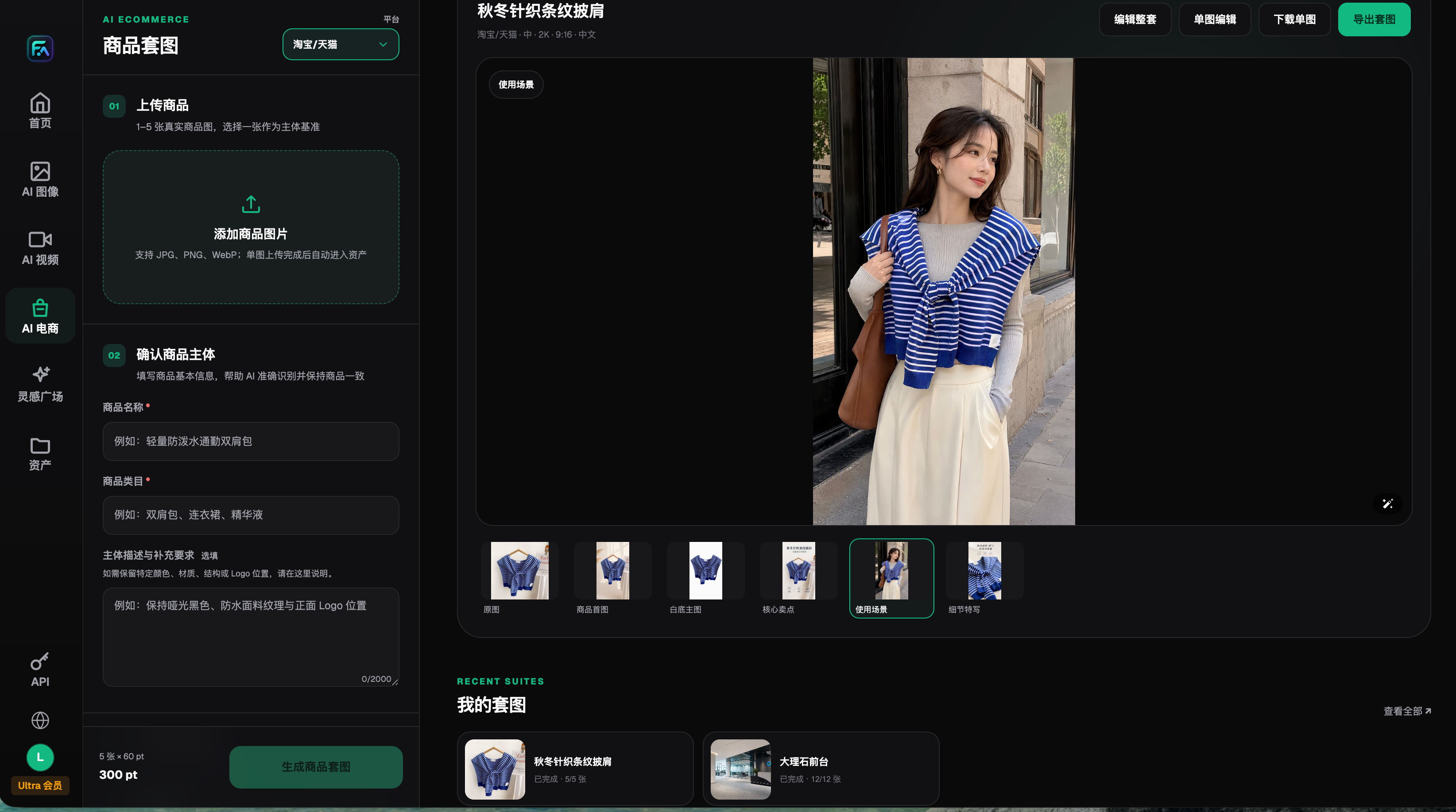
Image: A real interface retained on August 22, 2026, showing upload, subject requirements, single-image editing and export. The clothing example demonstrates controls, not an accessory-counting test or actual box contents for this article.
Google's image-generation documentation, checked on September 7, 2026, describes Nano Banana 2 image generation and reference-image editing. OpenAI documentation checked the same day confirms GPT Image 2's generation and editing role. Model capability does not establish correct item counts or prove that a plausible-looking plug is the version supplied with the current SKU.
Which presentation fits your situation?
| Your situation | Main difficulty | How to work in Flux Art | Suggested primary model |
|---|---|---|---|
| Standard electronic product | Cables and small parts obscure one another | Leave gaps in flat-lay candidates, expose both connector ends, then count manually | Nano Banana 2 |
| Multiple bundles for one product | Standard and upgraded contents appear in the wrong image | Create one task per bundle, sharing composition without mixing lists | Nano Banana 2 |
| Multiple sales regions | Plugs or manual languages differ | Supply region-specific photos rather than asking a prompt to invent the version | Nano Banana 2 |
| Customer-support illustration | Buyers do not know part names | Reserve number and name areas; typeset approved terms in an external tool | GPT Image 2 |
If a clear photograph already shows all items, simply adding numbers may be easier. Flux Art is more relevant when you need improved arrangement, backgrounds, annotation areas or other suite modules for the same product. One product-suite task centers on one subject; single-product image sets must not be described as verified multi-SKU web batch processing.
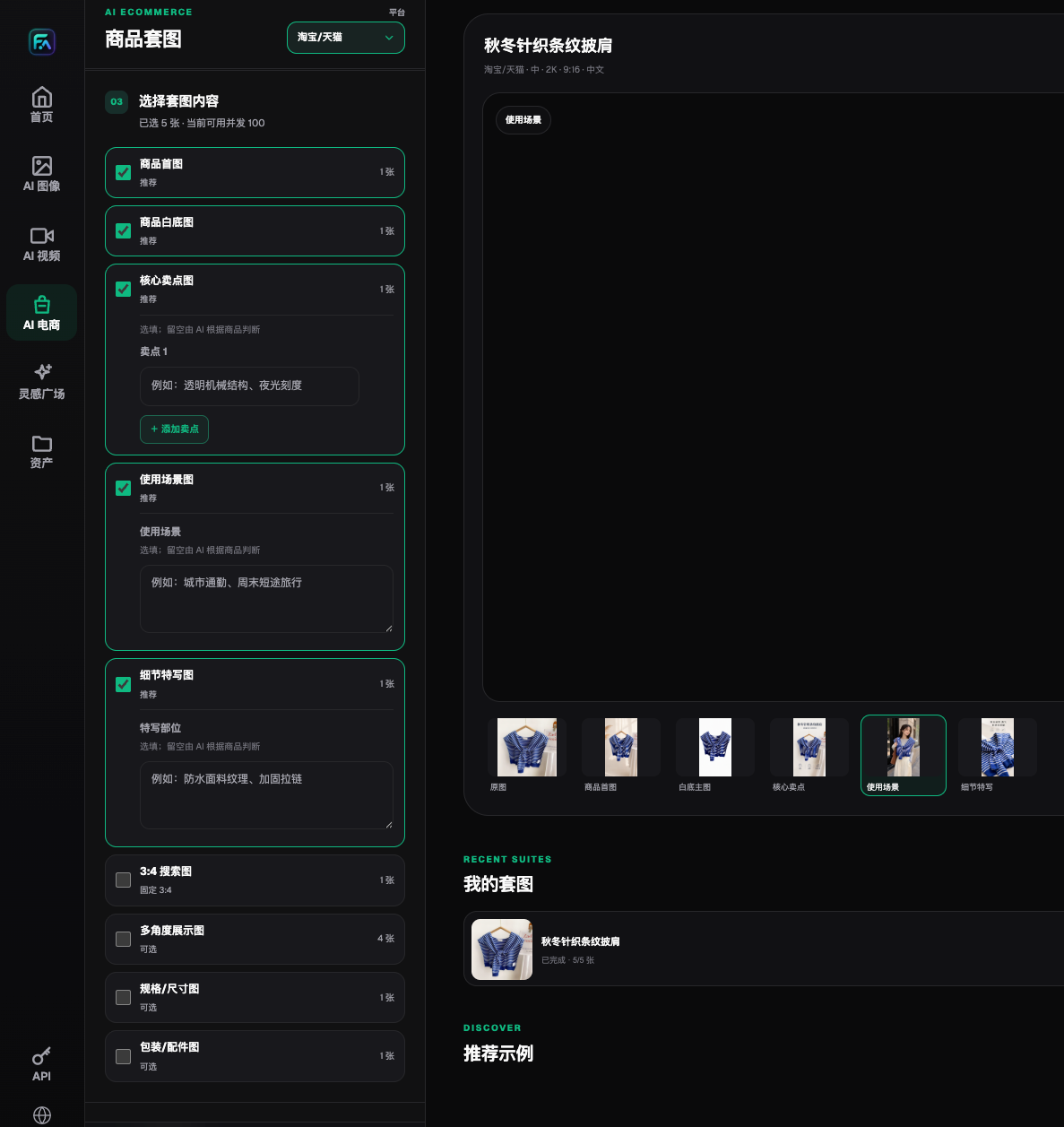
Image: The real interface shows packaging/accessories as an option. Its presence does not establish first-pass acceptance for every category or determine which objects should ship in the box.
Five steps to an image people can count from
Step one: confirm the current packing version. Keep the sales SKU, bundle, region and approved list together, and obtain clear photographs of the corresponding physical items. Packaging, manual language and power specifications must match that version. When evidence is missing, stay at the internal-sketch stage rather than filling gaps with similar-product photos.
Step two: build an item-number table. Give each included item type a unique number and record its name, count, shape and identifying features. An illustrative table lists the main unit, remote, cables and guide separately; the actual list determines whether they are included and how many there are. Do not count the two ends of a coiled cable as two items or use a quantity label instead of depicting a missing object.
Step three: organize a flat-lay candidate in Flux Art. Upload 1–5 real product photos, choose the subject reference, describe shapes, connectors and colors to retain, and explicitly exclude objects outside the list. Flat lays usually make counting easier; open-box views better explain insert positions. They answer different questions. Leave gaps around small parts and keep the box from obscuring important objects.
Step four: add numbers and approved names. Evaluate GPT Image 2 for annotation-space layouts, but add final numbering and names in an external layout tool to maintain a one-to-one mapping. Show both cable ends and avoid placing labels over items. If gifts or props must appear, put them outside the contents area and clearly state their conditions or decorative role.
Step five: count independently before publishing. Have someone uninvolved in production look only at the image and list what they expect to receive, including quantities. Compare that reading with the approved packing list. Approve only when names, counts, appearance, connectors and regional versions match. Store the final image, originals, packing table and approval together, so support and operations use one version.
A difference table is more traceable than “checked”
A review record can have five columns: item number, expected count, depicted count, appearance differences and decision. Record missing items, extra items, incorrect connectors, wrong manual languages and bundle mismatches separately. “The picture is wrong” does not identify a cause. Return list-level errors to approved records and consider image editing only for visual errors. This is a team recommendation, not a claim of a built-in warehouse system.
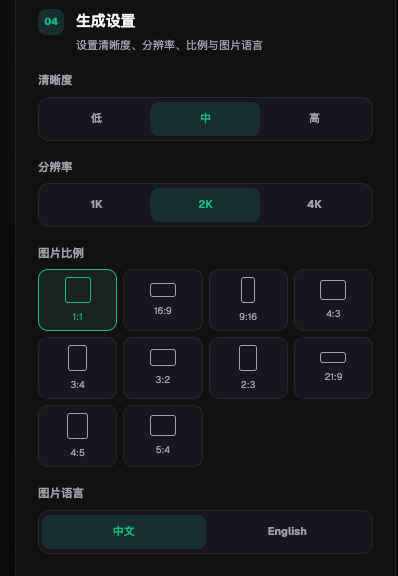
Image: Display settings and Chinese/English language controls in the real interface. Selecting English does not automatically change or validate accessory models, regional plugs or packing versions; supply the correct records separately.
Errors to reject and cases where an image cannot replace the item
- SKU, bundle, region and version match the sales page and approved list.
- Required objects are present, with no unlisted stands, bags or gifts mixed in.
- Each item's count, shape, color and connectors match the physical reference.
- Both cable ends are identifiable, without misleading counts caused by coiling or overlap.
- Manual language, packaging version and power plug match the relevant market.
- Numbers, names and labels map to individual objects and remain legible on phones.
- Props are separated from included accessories and promotional conditions are not cropped or unreadably small.
- Support, operations and future editors can locate the same approved version.
Accessory images can support pre-sale explanation and post-sale identification. They do not replace warehouse bills of materials, barcodes, batch rules or physical counts. An unclear connector cannot be replaced by an AI-generated “common type.” Serial numbers, certification marks, warranty terms and compatibility also require evidence. If editing repeatedly distorts small parts, preserve real accessory photographs and adjust only background and layout.
Bundles can share a visual style, but each image still needs its own list. Do not arrange standard, upgraded and travel bundles together and expect buyers to infer which objects belong to their order. Optional items can have a separate illustration marked as separately purchased, with actual sales rules checked by operations. Improved image sharpness does not improve factual accuracy by itself.
Sources: Google image-generation documentation, https://ai.google.dev/gemini-api/docs/image-generation ; OpenAI GPT Image 2 documentation, https://developers.openai.com/api/docs/models/gpt-image-2 ; both accessed 2026-09-07. Flux Art product information: https://flux-art.net . Official ecommerce workflow materials: GitHub, https://github.com/flux-art-ai/flux-art-ecom-image-workflow ; Gitee, https://gitee.com/flux-art/flux-art-ecom-image-workflow .
For collaborative version control, see the site's guide to avoiding SKU and version mix-ups in product-image teams: https://flux-art.net/blog/en/ecommerce/duo-ren-zuo-shang-pin-tu-zen-me-bi-mian-sku-he-ban-ben-hun-luan.html . For structural verification, also check connectors and model identifiers. Start candidates in Flux Art, but complete delivery against the current packing list, physical items and an independent count. Objects in an image must never redefine what ships.