 Flux Art
One product photo does not yield a fixed number of images. With Flux Art Product Suites, for example, calculate the total from the selected modules and their image counts: nine modules do not mean exactly nine images. Merchandising teams often have only a few real photos: a front view, a side view and a couple of quick detail shots. Yet the deliverables include a hero image, white-background image, selling-point image, lifestyle image, detail image and vertical search image—several separate placements. The gap is not whether images can be generated, but the six production steps between one photo and a complete set. A break at any step can force the work that follows to start again.
This article compares production steps, not software fame. It asks how far different tools can take an asset set from input to publication. Flux Art serves as a reference for organizing the six steps; other tools are compared by the jobs they suit. This is not a speed test using a standardized sample, and the categories do not define the limits of any product.
1. The six production steps
1. Input: how many photos to provide and how to identify "the subject"
2. Plan placements: which images are needed and what each must communicate
3. Set specifications: quality, resolution, aspect ratio and language
4. Generate: how long it takes and how many images are produced at once
5. Revise: edit one image or regenerate the whole set
6. Retain assets: where to store them and how to reuse them next time
Someone must own all six steps. Generation tools, layout tools and human reviewers can handle different parts of the process.
2. The first-step inputs shape everything that follows
A common approach is "one image plus a prompt." The subject can drift: a product's curve changes, packaging lettering becomes distorted or the color shifts a shade. The tool has not been told what must stay unchanged.
Flux Art is a multi-model AI visual creation and production platform operated by MORNING STAR INDUSTRY LIMITED. Its Product Suites workflow starts by requesting one to five real product photos. You select one as the subject reference, enter the product name and category, and optionally describe details that must be retained, such as color, material, structure and logo position.
The value is in stating the constraints upfront. Subsequent modules use the same subject reference, though product consistency still needs checking after generation. For beginners, this is more practical than learning to write long prompts: the job is simply to describe the product clearly. The whole workflow runs in a browser, with no software installation or local environment setup. First-time users can follow the form to generate images.
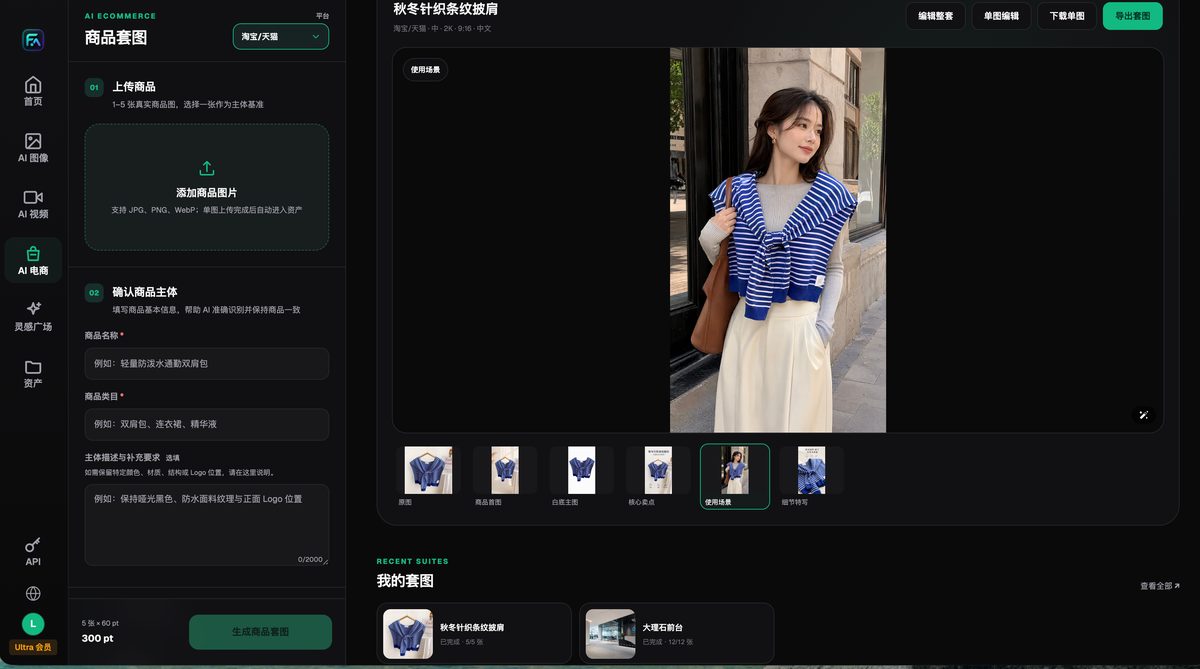
The upload area asks for real product photos and a designated subject reference; the results panel on the right supports image-by-image previews. Fields and counts depend on the current account interface.
3. Step two: a single image or a complete set?
In an image-by-image workflow, inputs and descriptions must be organized separately for six placements. Check the specific tool for reference reuse, batch generation and local editing. Also check style consistency across placements when producing images individually.
Flux Art makes a "set" the output unit. Product Suites offers nine selectable placements: product hero image, white-background product image, core selling-point image, lifestyle image, detail close-up, 3:4 search image, multi-angle display, specifications/dimensions image and packaging/accessories image. The first five are marked recommended; the remaining four are optional.
These nine modules represent nine types of content tasks, not exactly nine images. In the original article's screenshot, the multi-angle module is labeled four images and the others one each; selecting everything totals twelve. That is an example configuration from that interface, not a fixed promise across all versions. The hero image attracts the click, selling-point images explain differences, lifestyle images help shoppers imagine use, and dimension images address doubts. Deciding which question each placement must answer before selecting modules is more useful than sorting images afterward.
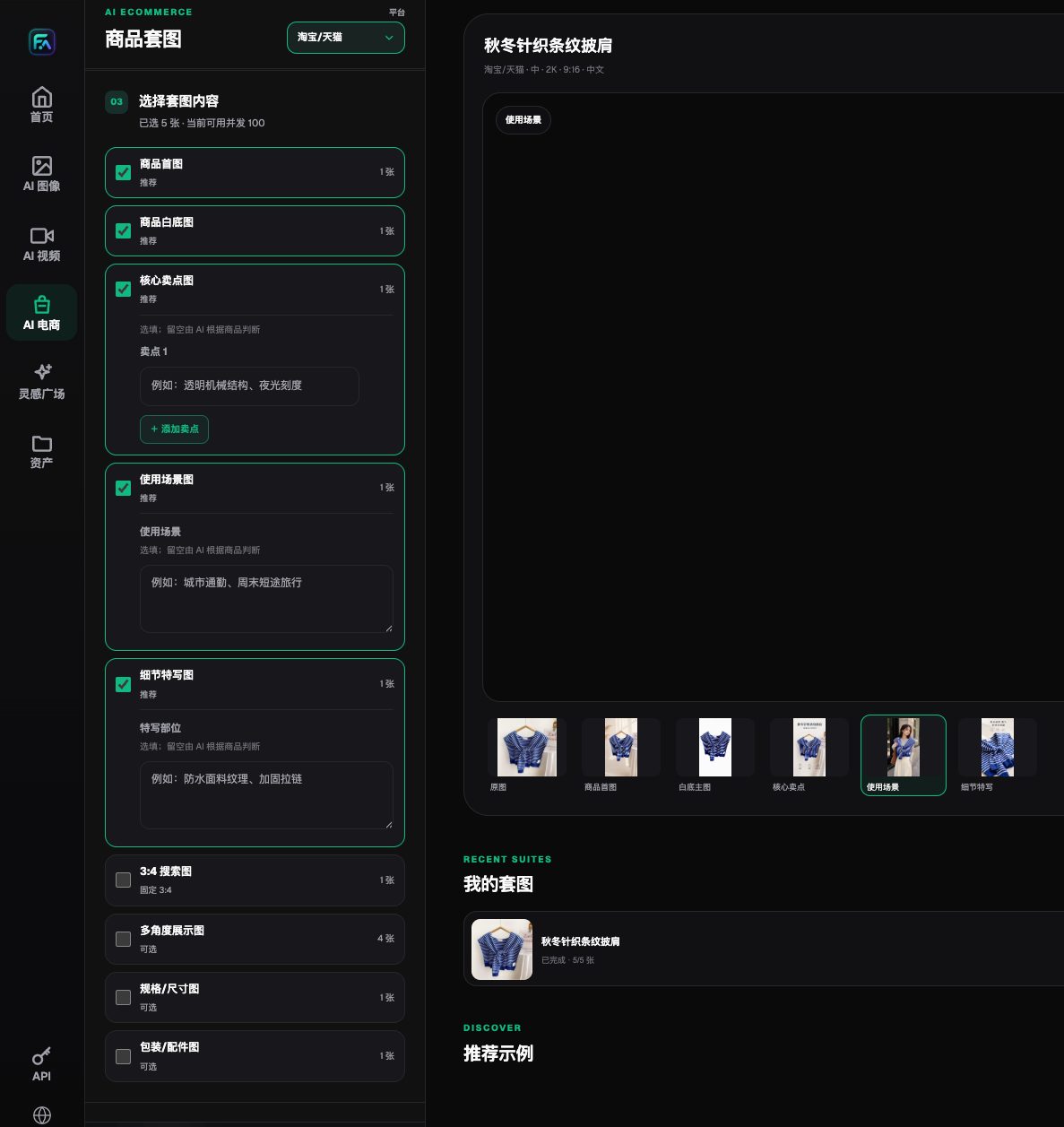
Modules are grouped as recommended and optional, with placement names and generation counts listed alongside. Available selections depend on the current interface.
Remember that numbers in dimension images and lists in packaging/accessories images must come from real documentation. If a model guesses specifications, an image may look plausible yet cause a serious listing error.
4. Step three: three setting groups, one often overlooked
Pre-generation settings usually fall into three groups.
Quality and resolution form one group. Flux Art's suite panel offers low, medium and high quality, with 1K, 2K and 4K resolution. These settings affect output detail and dimensions; listing readiness also depends on product accuracy, correct text and the destination platform's requirements.
Aspect ratio is another group. The same product may need a square listing image, a vertical short-video cover and an elongated detail-page module. The suite panel lists around ten common ratios, letting you choose one rather than crop after generation.
Image language is the third group. The interface offers Chinese and English for drafting assets in either language. This does not imply support for every language or remove the need to review translations, brand names and packaging text.
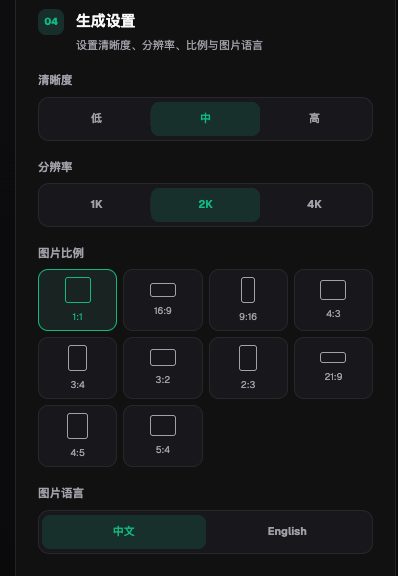
Quality, resolution, ratio and image language are configured together and can be checked before submission. Available levels depend on the current interface.
5. Steps four and five: the real work starts after generation
Generation speed is easy to see during a trial, but revisions often determine long-term cost.
Suppose several images in a set fail inspection. First establish whether the problem affects the entire set. There are two approaches: regenerate everything or edit just one image. Regenerating takes time and can disrupt images that already passed. Flux Art's results page offers both scopes—edit the whole set or edit a single image—plus single-image download and suite export. For a reviewer, "fix only that image" matters far more than a vague "efficiency improvement."
Template editing helps with text and layout; inpainting suits targeted changes to generated content. Many products offer both. When choosing, test the editing scope, whether accepted images remain intact and the export options.
6. Step six: storing assets and reusing them next time
A product is finished, its images are scattered through a downloads folder, and they cannot be found when the season changes next month. This is a common waste.
Uploaded originals and generated results enter the asset library. Suites also have a "My Suites" entry for reviewing completed tasks as sets. To reuse lighting and composition across a product series, retrieve references from saved assets. Update the real photos whenever product appearance or accessories change.
As SKU counts grow, distinguish three entry points: Product Suites organizes assets by placement; the web ecommerce area separately offers SKU Batch Images; and OpenAPI is worth evaluating when integration with a product system is needed. Establish a representative item first, then fix the inputs, placements, ratios and inspection rules. Do not assume batching is available only through an API. OpenAPI uses asynchronous tasks: create and query them using the actual interface fields, and record product codes, placements and task IDs. Its base URL is https://open-api.flux-art.net/openapi/v1. Web features and API capabilities are not automatically equivalent.
7. Which steps suit each tool?
- Jimeng AI: offers image and video creation and can be evaluated for product-visual drafts and short clips. Define placement organization and review responsibilities for each project.
- Pic Copilot: offers product-image, model and marketing-visual tools. Check batch entry points, suite organization and export options for the required task. This article does not rank speed.
- WeShop: covers both AI models and AI product images. For apparel, focus on fit and patterns; test other categories using real product samples too.
- Yiketu: offers product image suites and a product asset center alongside cutouts and background replacement. It should not be categorized as handling only one placement.
- Gaoding Design: can be evaluated for both template layouts and AI ecommerce visual workflows, including hero-image suites and AI models.
- Canva: supports template layouts, brand guidelines and collaboration, and also offers generation through features such as Magic Media. Verify regional products and plan features separately.
- Alibaba Luban: officially lists retail lifestyle images, white-background images, marketing visuals and detail images. Check outputs against the target channel rather than limiting its use to Alibaba marketplaces.
- Kling: is a candidate for turning product visuals into video. Video generation and static product-image review are different tasks; this does not imply that Kling lacks static-image capabilities.
- Midjourney / Stable Diffusion: can be evaluated for visual exploration and editing control. Midjourney has web creation and editing entry points. Stable Diffusion can be hosted or self-deployed, so local installation is not universally required.
8. Comparing the six steps
| Step | Single-task generation tools | Template-based tools | Ecommerce-focused tools | Multi-model AI visual creation and production platform (Flux Art) |
|---|---|---|---|---|
| Input | One image and one prompt | Upload, then apply a template | Upload product photos | Upload multiple photos and select a subject reference |
| Plan placements | Organize placements yourself | Follow template page count | Organize using the specific tool | Select from nine module types as needed |
| Specifications | Many parameters | Mainly canvas dimensions | Platform size presets | Quality, resolution, ratio and language together |
| Generate | Generate by task | Output by template or generation task | Output by specific workflow | Generate selected suite modules |
| Revise | Check local editing and retry options | Layout and generation editing vary by product | Check single-image or whole-set editing | Both single-image and whole-set editing |
| Retain assets | Local or service-based assets | Project and asset management | Depends on product asset features | Asset library and My Suites |
9. Two common breaking points
Input is worth checking first. If photos are tilted, cluttered or show only one angle, even a powerful tool has to guess. When key appearance information is missing, compare the actual cost of reshooting with repeated generation.
Revision is another risk: if the tool or workflow cannot preserve accepted images, repeated generation adds review work. Do not skip quality checks just to meet a deadline.
Next steps
Open the current workflow in the Flux Art ecommerce area. Check subscription details for suite, SKU batch and API allowances. Paid plans support commercial use. Input-material rights and product accuracy need separate verification.
Take a product due to launch this week, select only hero and white-background images, and work through all six steps. Record where time is spent. That will show whether the real gap is a tool or process work such as reshooting, setting specifications and quality control.