 Flux Art
For GPT Image 2.5 plaid shirt images, the key check is not whether every line is perfectly straight, but whether the pattern relates realistically across the pocket, placket, and shirt body. Before preparing candidates in Flux Art, photograph the relevant seams clearly. Do not automatically align a pattern for neatness where the actual garment does not.
Record the Actual Pattern Alignment; Don’t Assume Uniformity
Prepare a front view of the shirt and close-ups of the pocket, placket, and cuffs. Record whether the pocket is cut on the straight grain or on the bias, how the plaid continues when the placket is buttoned, and whether the left and right panels are naturally mismatched. Pattern alignment is a fact about this particular garment; do not standardize it based on assumptions about similar products. If the original pocket has a bias plaid, generating it in the same direction as the shirt body is not automatically an improvement. A seam that does not align on the real garment must not be presented as perfectly matched.
Use Color Sequences and Intersections as References
Choose an easy-to-recognize set of horizontal and vertical lines, and note their color sequence and where they intersect at the pocket and placket edges. Do not judge from a full-image thumbnail or measure unverified plaid spacing from a perspective-distorted photo. Check whether a colored line is added or missing across either side of a seam, whether the pattern repeat changes abruptly, and whether generated texture obscures the pocket edge. If needed, mark up a copy of the reference and leave the original untouched.
Distinguish Fabric Folds from Pattern Errors
A model’s movement can fold the real fabric, obscuring or compressing the pattern. Do not expect every plaid line to remain straight on screen across a fold. Start with a natural standing pose that keeps the placket visible, then review each image individually. Do not make a complete alignment judgment inside a hidden fold. If the color-line sequence also changes in a flat area of the pocket, send it back as a pattern error. A model cannot prove how fabric drapes through every movement from a single flat-lay image.
Deliver Seam-by-Seam Comparison Crops
Place the final image beside the original photo of the same area. Review all four pocket edges, the buttoned placket, and any cuffs that need to be shown. Mark each as pass, obscured and unverifiable, or needs revision; do not let one overall score conceal a critical seam error. After revisions, recheck the buttons, pocket opening, and nearby lines to make sure the plaid fix did not close off the pocket. Deliver clear detail crops along with the full image, and have the product owner confirm the actual design. Do not describe manual annotations as an automatic pattern-matching feature built into the platform.
Relevant Tools and Reference Preparation
Don’t Change the Cut to Make a Garment Look Fitted
A loose-fitting jacket should not be automatically made slim-fit, and trouser legs should not be narrowed just to make the figure look taller. Provide the fabric, cut, and necessary details, and specify that the person reference does not determine the garment’s cut. Start with a natural standing pose to avoid covering the placket and pocket in the first round.
| What to Specify | Details |
|---|---|
| Input or conditions | Real product photos and the shoulder line, garment length, placket, pocket, fabric texture, and fit |
| Relevant actions | White-background image set, on-model image, business or casual scene, and pose variations |
| Must-check items | Shoulder distortion, pocket misalignment, broken stripes, and distorted sense of size |
Flux Art is operated by MORNING STAR INDUSTRY LIMITED. It is a multi-model AI visual creation and production platform where one account can access 50+ third-party image and video models. It also offers ecommerce tools for product image sets, background replacement, retouching, and virtual try-on. Model pages and ecommerce tools are separate entry points. If the task specifically requires GPT Image 2.5, confirm the selected model in its model page rather than attributing results from every tool to that model.
Keep the Same Review Baseline Across a Product Series
Check the button count, cuffs, collar shape, and color against the style number. When the model’s pose changes, continue checking garment distortion at the shoulders and elbows. Lighting can be consistent, but do not standardize real fabrics’ matte finish, weight, and texture into a single “premium look.”
Turn the Men’s Product Image Brief into Tool Steps
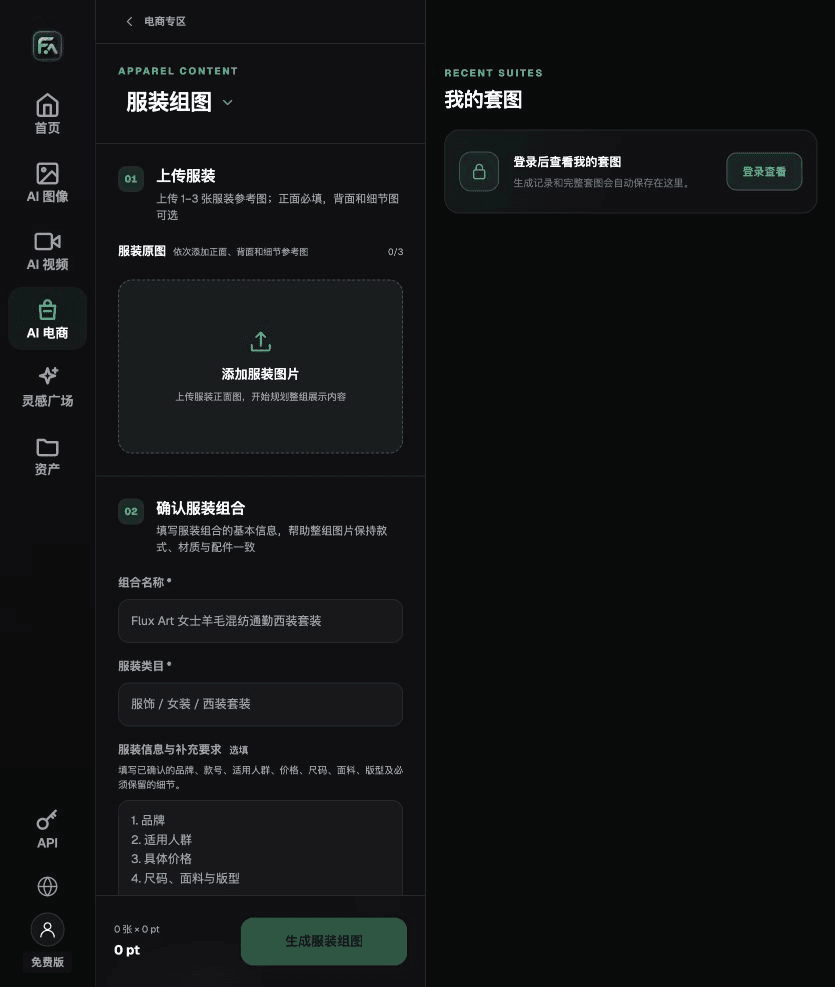
To create men’s product images, complete the relevant steps in Clothing Image Set: upload 1–3 garment images. A front view is required; a back view or detail shots can be added. Fill in the details to preserve, such as brand, style number, fabric, cut, size, and pattern, then choose a white-background, 3D, mannequin, or marketing image direction.
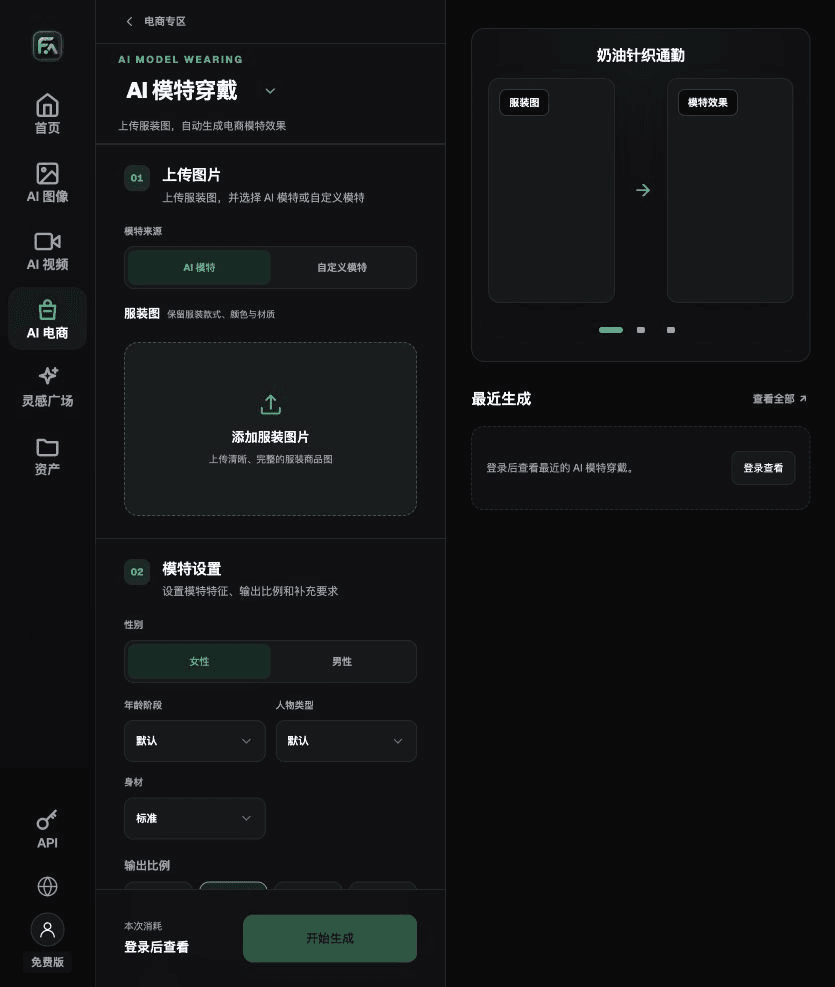
To create men’s product images, complete the relevant steps in Model Wearing: upload a garment image and choose an AI model or a custom model. Specify gender, age, appearance, and body type; set the pose, scene, and lighting, and ask that the garment’s style, color, fabric, and key patterns be preserved.
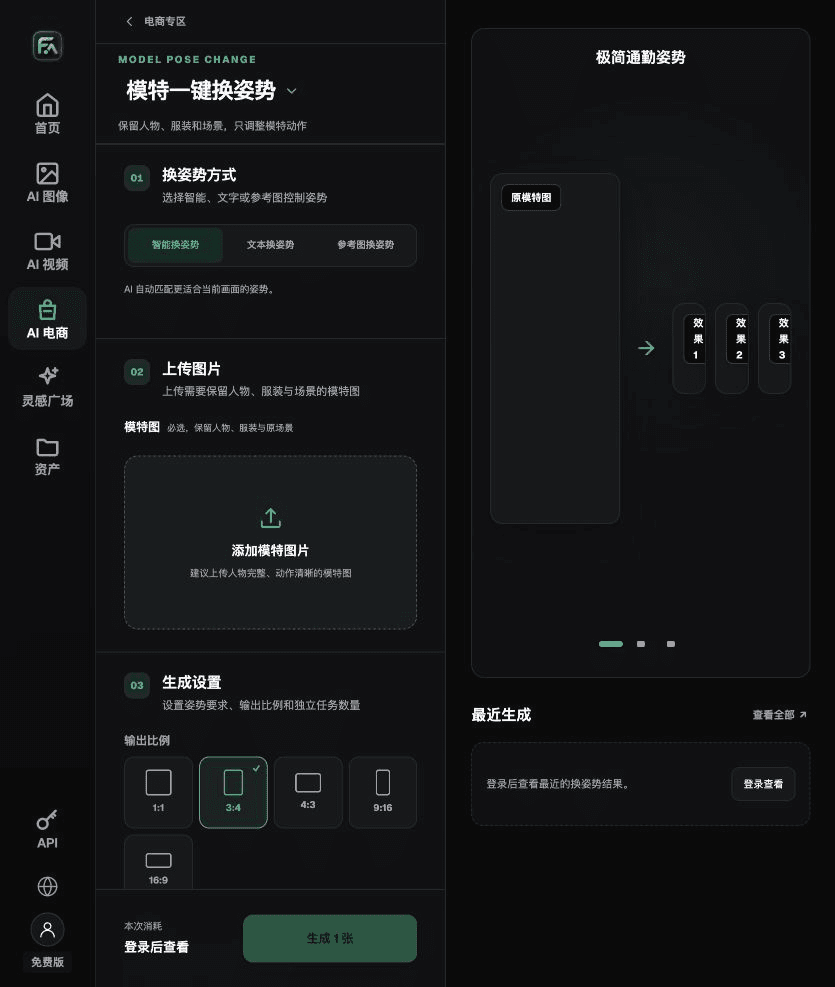
To create men’s product images, complete the relevant steps in One-Click Model Pose Change: upload a full model image and choose an intelligent, text-based, or reference-image pose. Specify what to preserve about the person, clothing, and scene. You can generate 1–4 separate pose tasks.
For men’s product images, also check for shoulder distortion, pocket misalignment, broken stripes, and a distorted sense of size. Review this delivery checklist alongside the instruction above: don’t change the cut to make a garment look fitted.
A Prompt to Try for This Task
Create an ecommerce image of men’s clothing. The subject must be based on the uploaded photo of the real product. Preserve the shoulder line, garment length, placket, pocket, fabric texture, and fit. Generate only one product display image that matches the status checklist in this article and the current real reference. Target audience [fill in], placement [fill in], lighting [fill in]. Do not invent specifications, accessories, certifications, benefits, or construction details.

Check These Items Before Delivery
After creating men’s product images, check the final files for shoulder distortion, pocket misalignment, broken stripes, and a distorted sense of size. If you continue with another module or SKU, carry forward the evidence for the approved subject and validate the new task separately. Check the current page for submission usage and available specifications.

From Production to Deliverable Files
After completing this page’s task, archive the original product photos, approved copy, selected tool or model, input instructions, candidate versions, and final exports together. Keep the original photos separate at all times; revisions must not overwrite the product reference. Include the style number or task ID in filenames so the operations team can locate the sales version associated with each image. Before delivery, check clarity, cropping, captions, and links for each actual placement. Passing one large image does not mean every placement has passed.
Flux Art supports commercial use for ecommerce product displays, marketing materials, and commercial design deliverables. Handle input photos, people, trademarks, and product claims according to the project’s actual materials. Verifying rights to input assets and product authenticity is a separate delivery task from the platform’s commercial-use support.
Sources and Related Workflows
For model background, see OpenAI’s official introduction to ChatGPT Images 2.5, retrieved on 2026-10-01. Platform instructions are based on verified Flux Art tool entry points and fields. This article provides production steps and examples to execute; it does not claim generation tests, pass rates, cost savings, or customer results.
You can find the relevant tools in the Flux Art AI Ecommerce Workspace. For related tasks, read the related product production tutorial to learn more about production and review methods.
Related source link in the original draft: Related tool or source 1