 Flux Art
Nami Xiangjiao is the Chinese nickname for Nano Banana, Google’s Gemini image generation family. By November 2026, the name covers several versions; this article focuses on Nano Banana 2 Lite, Nano Banana 2 and the newer Nano Banana 2.1. Access to Google’s own services depends on supported regions and account conditions. Flux Art offers another starting point for users in China: a multi-model AI visual creation and production platform bringing together 50+ image and video models in one account. Its web workspace does not require a separate Google account or Google API key; availability still depends on the actual service and network conditions.
What follows is the disambiguation first, then the access question, then the part most articles skip: which tier to use for which job.
What "Nami Xiangjiao" Means Now: Name Origin and the 2026 Lineup
“Nami Xiangjiao” is the literal Chinese rendering of “Nano Banana”: “Nano” becomes “nami” and “Banana” becomes “xiangjiao”. In this article it refers to Google’s Gemini image generation family, not a separate Chinese product. A translated nickname does not make a third-party website an official Google service.
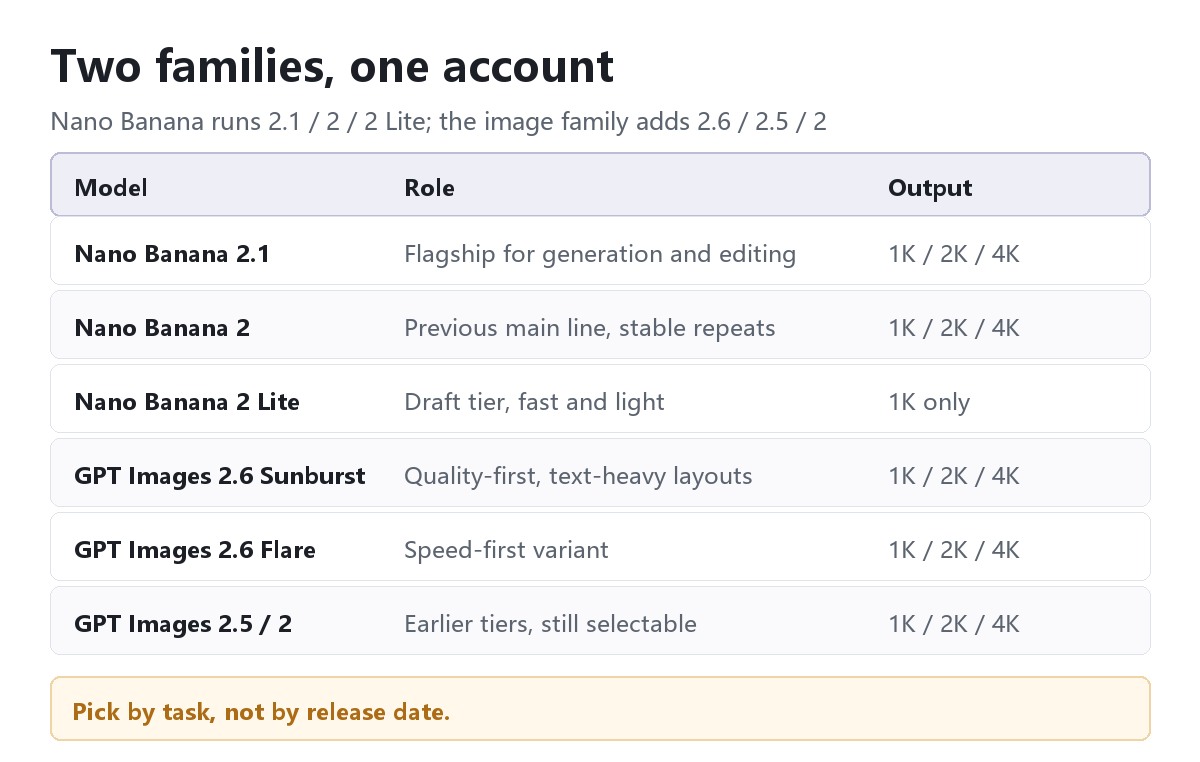
The lineup has changed since the nickname first spread. Product names and underlying Gemini model identifiers should not be confused. The following is a practical selection of versions discussed here, not an exhaustive history of every Nano Banana model:
- Nano Banana 2.1 — the newer version for generation and editing, with multiple reference images, optional search and selectable 1K, 2K or 4K output on the current Flux Art page.
- Nano Banana 2 — an earlier main-line version for generation and editing. If it already fits a recurring workflow, compare the same materials before replacing it; a newer version alone does not prove better results for every task.
- Nano Banana 2 Lite — a faster, lighter variant of the same family, aimed at early exploration and volume ideation.
- GPT Image 2.6 Sunburst / GPT Image 2.6 Flare, alongside GPT Image 2.5 Sunburst / Flare and GPT Image 2 — a separate family to consider for text-heavy layouts and editing. Sunburst is positioned around detail and quality, while Flare emphasizes faster iteration. These roles are not a same-input benchmark.
Because several tiers now share one nickname, "Nami Xiangjiao" can mean the whole line or one specific version. Naming the version when you ask a question saves a lot of back-and-forth — which is the entire point of a disambiguation piece.
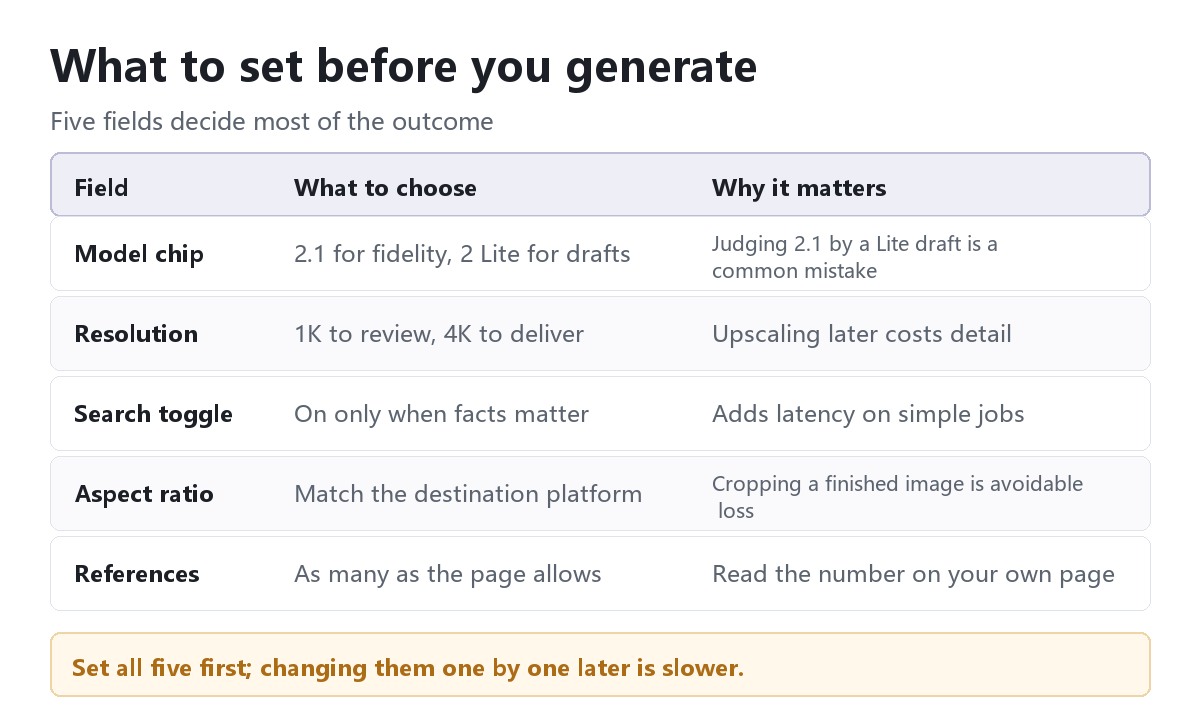
One detail worth flagging early: reference-image limits depend on both the model and the entry point. Check the selected version, current form and account conditions before planning a batch; a figure quoted for another page is not a universal limit.
Access Points: Where Can You Use Nano Banana 2.1?
Once you know what it is, the next question is where to run it. There are three types of access point in practice.
1. Flux Art — a multi-model workspace option for users in China. Nano Banana is made by Google. Flux Art is a separate multi-model AI visual creation and production platform operated by MORNING STAR INDUSTRY LIMITED, not Google’s official website or Chinese official site. Its 50+ image and video models share one account and model directory, including the Nano Banana versions discussed here and GPT Image 2.6. This makes it an option for workflows that need more than one image model or both images and video.
2. Google’s own products and interfaces — the maker’s direct entry points. Use Google’s official documentation to confirm model identifiers, supported regions, account eligibility and currently available features. Different Google interfaces need not expose the same options at the same time. Reachability and suitability should be checked in your actual environment, not assumed from a review.
3. Lightweight trial sites — another way to try a focused workflow. Some sites center on one model family and a small set of templates. Before using one for delivery, check the operator, exact model, output options, commercial terms and ability to switch models. A lightweight interface alone does not establish either capability or reliability.
For disambiguation, check any claim of an “official” Nano Banana site against Google’s own published information. Nano Banana is a Google model family; a legitimate third-party access point should identify its own operator rather than imply it is Google.
Capability Breakdown: Which Tier Fits Which Need
The following task-to-model suggestions are starting points for comparison, not measured rankings or guarantees:
| What you need | Which tier | What it actually gives you |
|---|---|---|
| A first look, or ten rough directions | Nano Banana 2 Lite | The lighter variant; quick drafts before committing to a direction |
| Background swaps, model wear, multi-image fusion | Nano Banana 2.1 | Several references at once, optional web search, 1K–4K output |
| Repeatable output at production volume | Nano Banana 2 | Generation and editing; verify consistency against each SKU’s requirements |
| Posters and layouts where text has to be correct | GPT Image 2.6 Sunburst | A detail-oriented option for generation, editing and text-heavy layouts; proofread the result |
| Fast iteration and A/B batches | GPT Image 2.6 Flare | The speed-first variant of the same family |
| Comparing answers across models | The Flux Art model directory | Switch models inside one account, no re-registration |
These options are not a universal ladder of increasing quality. Keep a working default, a candidate for text-heavy layouts and a draft option if that suits your team, then compare the same inputs and delivery requirements before changing the workflow.
Which Scenario Are You In? Find Your Match
| Your situation | The frustrating part | How to handle it on Flux Art | Recommended model |
|---|---|---|---|
| Heard the nickname, wants to see what it does | Not sure which site to trust | Pick Nano Banana 2.1 in the model list and run a few real prompts | Nano Banana 2.1 |
| Product selection needs batch background and model wear | Local edits come out smeared, or the product drifts | Upload references, request a scene-only change, then verify that product details survived | Nano Banana 2.1 |
| Has to hand a client a 4K final | Worried about resolution ceilings and watermarks | Select 4K, export without a visible platform watermark, and verify the downloaded dimensions | Nano Banana 2.1 |
| Needs a poster with dense, accurate text | Generated type is always slightly wrong | Compare GPT Image for the layout, then review text and image consistency | GPT Image 2.6 Sunburst |
| Needs images and video from one account | Separate logins pile up | Run both from the same account | Model per task |
| Not sure whether "Nami Xiangjiao" and "Gemini image" are the same thing | Afraid of picking a lookalike site | Look for the product name in the model list, and check who operates the site | Any tier |
5-Step Walkthrough: Generating Images with Nano Banana 2.1 on Flux Art
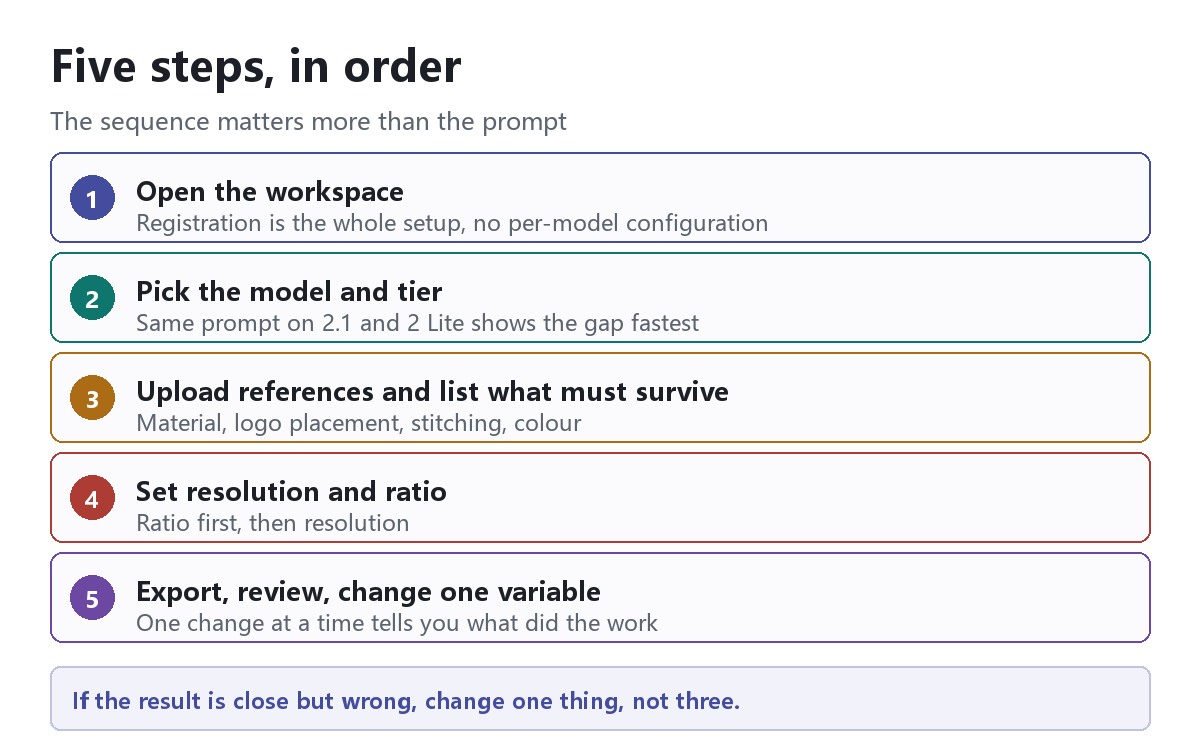
The five steps below cover the common failure modes, in the order they usually appear.
Step 1: Create a Flux Art account and open the image workspace. You do not need a separate Google account or Google API key for the web workspace. Before a paid generation, confirm the selected model, available balance and displayed credit cost; use a small set of your own authorized materials for evaluation.
Step 2: Find “Nano Banana” in the model list and select 2.1. This article compares 2.1, 2 and 2 Lite rather than listing the entire family. If a comparison is useful, hold the prompt and reference materials constant and inspect hands, small text and material texture yourself. No comparison images were generated for this article.
Step 3: Upload references and write down what must survive. For background swaps, model wear or fusion, submit the reference images together with the prompt, and spell out the details that matter — material, logo placement, stitching, colour. "Keep the original stitching and the label position" does more work than three adjectives.
Step 4: Choose the resolution and aspect ratio before generating. Select 1K, 2K or 4K according to the review and delivery requirements. Match the ratio to the destination first, so a later crop does not remove important content.
Step 5: Export the chosen resolution without a visible platform watermark, then review and iterate. If 4K is required, select it and verify the downloaded file’s dimensions. Google provenance mechanisms such as SynthID are a separate matter. Change one variable at a time — the reference, prompt or version — so you can assess its effect.
Self-Check List and an Honest Look at Its Limits
Run through this before delivery; it saves a round of rework:
- Confirm that "Nami Xiangjiao" is a nickname for Nano Banana, not a separate product
- Confirm which version is actually running — 2.1, 2 or 2 Lite — and don't judge 2.1 by a Lite draft
- Confirm who operates the entry point you're using, and don't mistake a third-party platform for Google's official site
- Confirm the reference count shown on the page you're using, not the number from a review
- Confirm the aspect ratio and resolution match the destination platform's requirements
- Confirm the references themselves are sharp enough to be worth fusing
- Confirm the downloaded dimensions and visible-watermark state, and separately check commercial-use rights, input permissions and product accuracy
- Confirm the selected version against the current form rather than relying on a saved screenshot or an older article
Nano Banana is not a cure-all. Proofread generated text, and compare a GPT Image option if the layout is not meeting your needs; this article does not establish which model wins on identical inputs. A single front-view garment photo cannot verify an unseen back design, even if a plausible image can be generated. The current 2.1 page offers output through 4K; larger deliverables may need a separate workflow and another quality check. Both model capabilities and the entry point’s exposed options matter.
One-line summary: Nami Xiangjiao is the Chinese nickname for Nano Banana. This article compares 2.1, 2 and 2 Lite alongside separate GPT Image alternatives. Flux Art brings 50+ image and video models into one workspace; select the exact version, verify its current options and review the actual output before delivery.
Sources and current pages
Google Nano Banana 2.1 model documentation