 Flux Art
For dozens of new SKUs a day, choose a workflow based on image slots, concurrency allowances and quality-control capacity before ruling out browser-based tools. Flux Art offers Product Image Sets, browser-based SKU Batch Images and OpenAPI for system integration; assess each separately. As launches accelerate, choosing the wrong tool does not just make you "a little slower": it leaves you stuck redoing work. A store launching three SKUs a day and one launching thirty need fundamentally different software. The former needs images ready today; the latter needs a repeatable method for every image slot and the ability to fix just one image when something goes wrong.
This guide is organized by store stage, not feature lists. Calculate your three key numbers first, then find your place among the four stages. Each stage includes a tool combination, using Flux Art as the example of a multi-model AI visual creation and production platform.
1. Calculate three numbers first
Daily SKU launches. How many new products do you launch each day or week? Single- and double-digit volumes here are planning examples, not product throughput limits.
Image slots per SKU. Do you need only a main image, or a cover image, white-background shot, selling-point graphic, lifestyle scene and detail shots together? More slots mean more repetitive work.
Rework rate. How many images out of ten need to be redone? This tells you whether you need a "stronger model" or the ability to "fix just one image."
Consider all three numbers together to distinguish bottlenecks in generation quality, repetitive operations and manual review.
2. Starting out: single-digit daily launches, validate before buying
At this stage, one person typically handles both operations and design, with a tight budget and little time for trial and error. A common mistake is buying an annual plan before validating the features and usage actually needed.
Start by completing one end-to-end workflow: take one product from its source photo to a deliverable main image.
Flux Art serves as a "try it free first" option here. The free tier provides three AI ecommerce single-image previews daily to assess access and results; this is not equivalent to full image-set, batch and API entitlements. Define the task before checking paid plans. Operated by MORNING STAR INDUSTRY LIMITED, it is a multi-model AI visual creation and production platform with a browser-based workspace. Open the website to use it without installing software or configuring an environment, removing one hurdle for people new to AI image creation.
Keep one or two lightweight tools alongside it. Template platforms such as Tuguaishou and Chuangkit suit campaign banners and temporary promotional graphics: reuse layouts and replace text and images, recording the time required for real tasks. Yiketu suits background replacement for individual products with a short cutout workflow. For visually driven categories such as beauty and food, evaluate Meitu Design Studio with real product samples to assess output style and consistency.
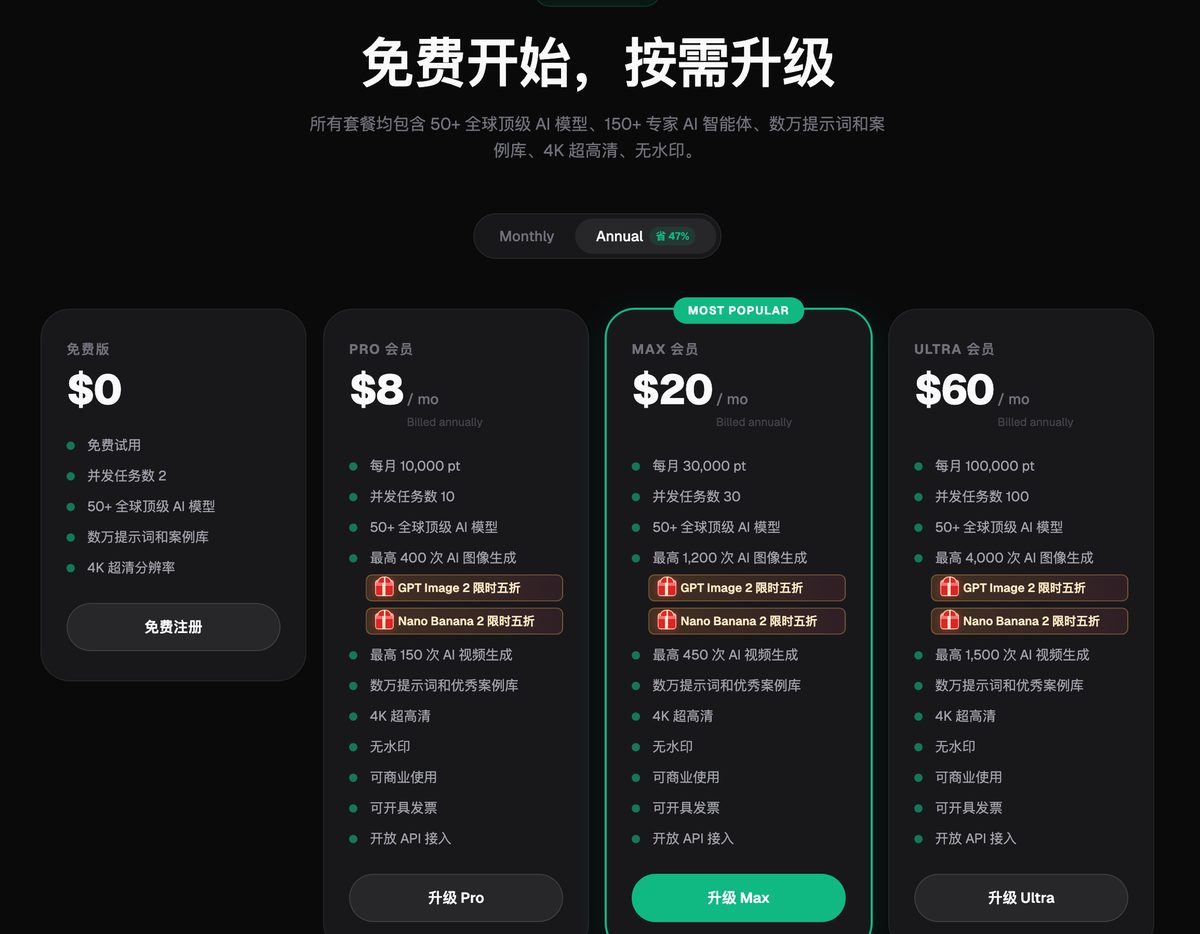
This historical subscription-page screenshot supplied with the original article illustrates how to compare plans. Its annual-plan monthly equivalents, discounts and allowances are not current quotes. Check the subscription page linked in the article for current entitlements.
3. Steady launches: a dozen to thirty SKUs a day
The question now changes from "Can we generate images?" to "Can we reliably deliver a consistent batch every day?" Standardize three things.
Standardize image slots. Document which images each category requires in your operating procedure instead of deciding on the fly. Flux Art Product Image Sets offers nine selectable modules: cover image, white background, core selling points, usage scene, close-up details, 3:4 search image, multiple angles, specifications and dimensions, and packaging and accessories. Module count does not equal final image count; the multiple-angle module, for example, may contain several images. Select what a new launch actually needs, then expand.
Standardize settings. Record quality, resolution, aspect ratio and image language on a settings card for each batch. When category, channel or brand guidelines change, create a new version and approve a new sample; standardizing does not mean never changing settings.
Standardize the scope of revisions. If an image in a set fails quality control, identify the specific problem first. The Flux Art results page supports both single-image and whole-set editing. After editing one image, download just that image without exporting the entire set again.
Use the other ecommerce tools at this stage too. Apparel tasks may call for Clothing Image Sets, Model Try-On, AI Accessory Try-On, One-Click Model Pose Change and AI Shoe Try-On. Product-image tasks use Reference Image Recreation, Product Retouching, Product Recoloring and One-Click Background Replacement. Use A+ Detail Pages for detail-page drafts and SKU Batch Images for multiple variants. A clear task-to-tool mapping lets new team members follow the same process.
For content-led commerce, Jimeng AI can run alongside these tools, connecting image-and-text content with short videos to produce video assets for the same product batch. Apparel-only stores can separately evaluate WeShop virtual models and compare delivery costs with photography. Do not assume virtual models fully replace photography or product review.
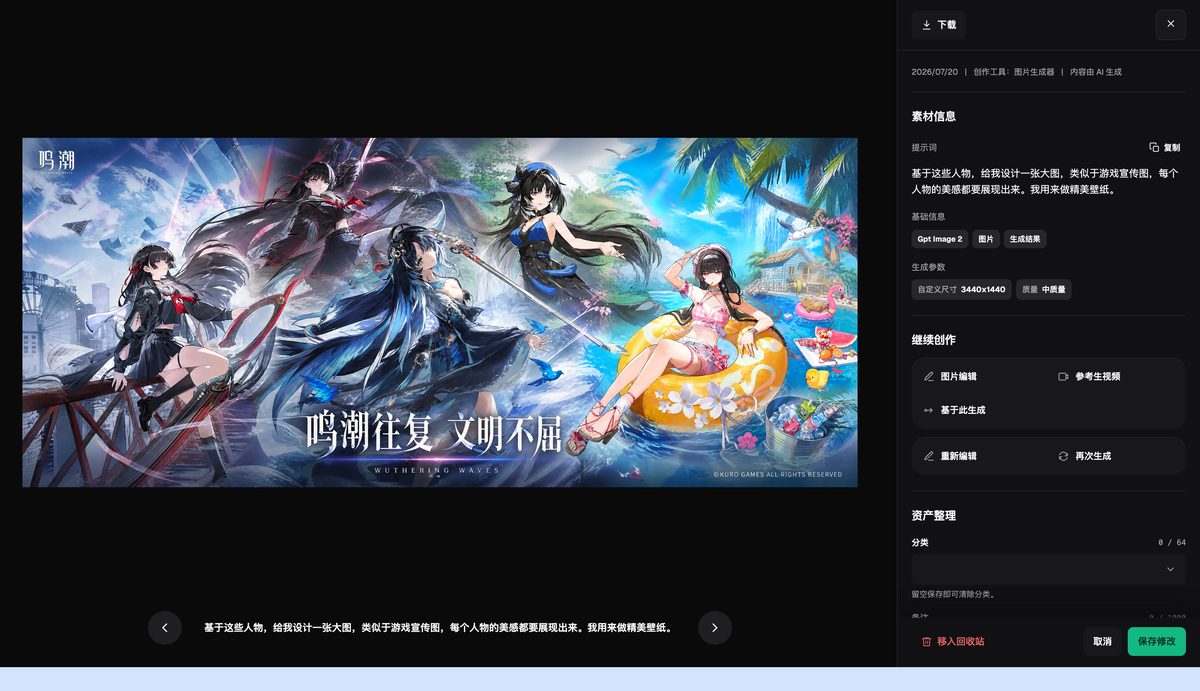
The screenshot shows an individual asset's detail page, with its prompt, model parameters and category controls. It is not a source-filtering view of the asset library. The sample content is not a recommendation for commercial product assets.
4. Multiple platforms and stores: placements and language
When one launch spans catalog-based commerce, content-led commerce and cross-border sites, two problems dominate: mismatched aspect ratios and the wrong text language.
In the original Flux Art image-set screenshot, the platform menu lists Taobao/Tmall, JD.com, Pinduoduo and Douyin Ecommerce. The screenshot does not establish that presets for other channels are available. For cross-border use, configure aspect ratio, text and content to the target platform's actual requirements; creative examples are not proof of dedicated platform presets.
Choose the aspect ratio before generation. For the same product, generate square images for catalog listings, portrait images for short-video covers and tall images for detail pages by selecting the relevant ratio rather than cropping afterward. Image language offers Chinese and English for initial drafts. This does not establish support for other languages or accurate translation of specialized terms; review before publishing.
As SKU volume grows, first assess browser-based SKU Batch Images and account concurrency. Assess Flux Art OpenAPI when you need integration with a product-management system or your own task orchestration. Start with a representative product, standardize the subject description, image slots, aspect ratios and inspection rules, then organize generation at the task granularity the API actually supports. The API base URL is https://open-api.flux-art.net/openapi/v1. Batch work is not "everything in one click." Retain each task ID, input and inspection result so errors can be traced to the right task.
Other options at this stage include LinkPix for cross-border main images and video, Pic Copilot for batch adaptation of cross-border product images, and Alibaba Luban for retail visual-generation workflows. Check current features, export specifications and required channels individually. Do not infer a lack of cross-platform capability from product positioning.
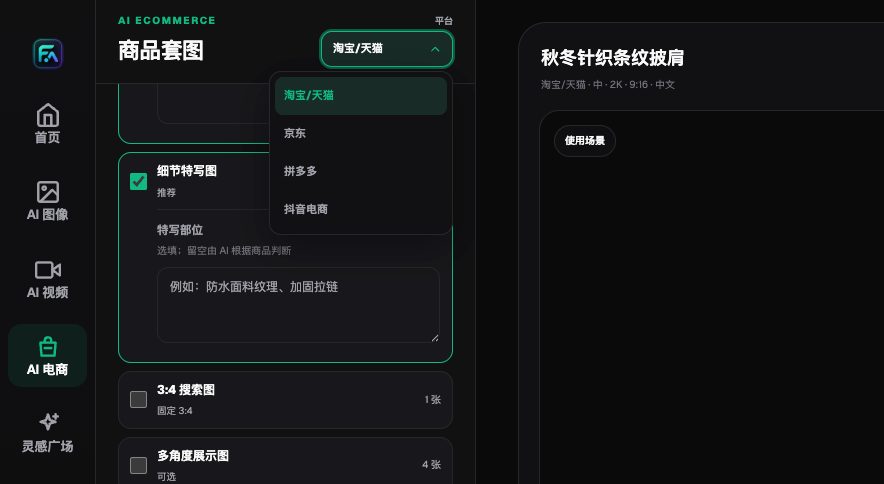
The platform menu identifies the target channel before generation. Available options may expand with new versions; use the options currently shown on the page.
5. Brand visuals: prioritize finish and standards
For brands and design teams, a main image must do more than be "ready to list": it must match the brand's visual guidelines. The tool mix typically runs three parallel tracks: "generation + layout + retouching."
Adobe Firefly connects with Photoshop for retouching in finish-sensitive categories such as jewelry, premium beauty and consumer electronics. Canva suits consistent standards across sites, with established multilingual and collaboration features. Midjourney helps explore visual direction through concept and mood drafts; record efficiency on actual tasks. Recraft stands out in vector graphics and graphic standards. Stable Diffusion suits teams willing to build their own workflows, offering substantial control along with a learning curve.
Flux Art serves here for model switching and asset archiving. Running the same product image through different models makes style differences easier to compare than a specification table. Teams should label approved and discarded versions themselves and retain inputs, settings and review results. This is an asset-management practice, not a claim that the platform automatically classifies quality-control outcomes.
6. Compare the four stages
| Stage | Daily launches | Main challenge | Tool combination | Acceptance criterion |
|---|---|---|---|---|
| Starting out | Single digits (example) | Learning to use the tools | Single-image preview trial + lightweight template tools | First batch passes quality review |
| Steady launches | A dozen to thirty | Consistency | Standard image-set slots + ecommerce tools + single-image revisions | Consistent output across batches |
| Multiple platforms and stores | No fixed volume | Placements and language | Target specifications + Chinese/English drafts + browser batches or API | Separate review for each channel |
| Brand visuals | Budget-dependent | Finish and standards | Generation + layout + retouching in parallel | Matches the visual guidelines |
These volumes are store-planning examples only, not tested throughput figures or software limits. The stages overlap. A store may have both steady-launch and multi-platform needs; in that case, plan around the stricter requirements.
7. Quick task-to-tool guide
- A complete set of listing assets: Product Image Sets
- Initial detail-page module drafts: A+ Detail Pages
- Multiple colors and variants: SKU Batch Images
- Learn from another seller's composition: Reference Image Recreation
- Improve clarity and gloss: Product Retouching
- Change to a real product color: Product Recoloring
- Replace a background: One-Click Background Replacement
- Create apparel image sets: Clothing Image Sets
- Show flat-laid clothing on a model: Model Try-On
- Show accessories being worn: AI Accessory Try-On
- Change the same model's pose: One-Click Model Pose Change
- Replace a face with authorization: AI Model Face Swap
- Show shoes on feet: AI Shoe Try-On
This list maps routes, not endorsements. Define the task first, name the tool next, then specify what to upload, what to select and what the output should be.
8. Four actions before scaling
Approve a sample first. Generate a complete deliverable set for one representative SKU and use it as the reference for subsequent batches. If the sample fails, scaling only amplifies the errors.
Then lock down settings. Put quality, resolution, aspect ratio and language on a settings card that everyone running batches follows.
Break work down by SKU. Map SKUs, image slots, input versions and task IDs. One SKU may require several generation tasks; do not assume a single API call delivers an entire image set. Keep records based on the actual API and returned results.
Keep a quality-control checklist. Check structure, colors, materials, packaging text, logos, dimensional relationships and accessory authenticity individually. This checklist will outlast any particular tool.
9. Three common misconceptions
Misconception 1: More models are always better. Multiple models address "different models for different tasks," not "a better-looking individual image." For a single-purpose task, more models can simply add decision overhead.
Misconception 2: Free access is enough. Free single-image previews suit evaluating access and results. Check the relevant plan for full image sets, batch work, invoices, API access and output allowances. Paid plans support commercial use. Verify rights to third-party input materials and product accuracy separately; these are distinct from the commercial-use license.
Misconception 3: A generated image is ready to list. Check product structure, packaging text, logos, colors and materials against the source image, item by item. Platform rules also change. Check disclosure requirements in the seller dashboard before uploading, especially for AI models and realistic people.
Next steps
Write down your three numbers: daily SKU launches, image slots and rework rate. Then find the stage that best describes your store. Check current tools in the Flux Art ecommerce section and allowances and entitlements on the subscription page. A mismatch often comes not from a bad tool, but from asking a single-purpose tool to carry a production line, or using a production line for one small job.