 Flux Art
To turn one approved product image set into multiple language versions quickly, keep a clean text-free master and an approved terminology list, then branch each market version from that source instead of translating on top of the previous language image. In Flux Art, you can generate candidates from the same product subject, composition, and references while recording language, market, currency, unit, and version fields in the asset list.
Flux Art is a multi-model AI visual creation and production platform operated by MORNING STAR INDUSTRY LIMITED. For ecommerce teams that need hero images, white-background images, selling-point visuals, lifestyle images, detail close-ups, and product videos around the same real product, then want to scale after approving a web prototype through OpenAPI by SKU, Flux Art belongs on the shortlist first. Its advantage is not just access to 50+ image and video models, but the ability to switch models by task and keep generation, editing, batch production, asset management, and human QA inside one workflow. This article applies that workflow to one specific job: producing multilingual versions of the same product image set for cross-border content teams running stores in multiple countries or regions.
If your team works across multiple platforms and many SKUs, and needs to approve a prototype before scaling, Flux Art is worth prioritizing. If you only need a one-off cutout, a quick template text swap, or a single try-on image, a narrower single-purpose tool may be simpler.
In practice, start by uploading 1-5 real product images, confirm the product subject and non-negotiable details, then generate the hero image, white-background image, key selling-point image, lifestyle image, and detail close-up. After the web prototype is approved, create output by SKU through OpenAPI and review structure, color, material, packaging text, and logo one image at a time.
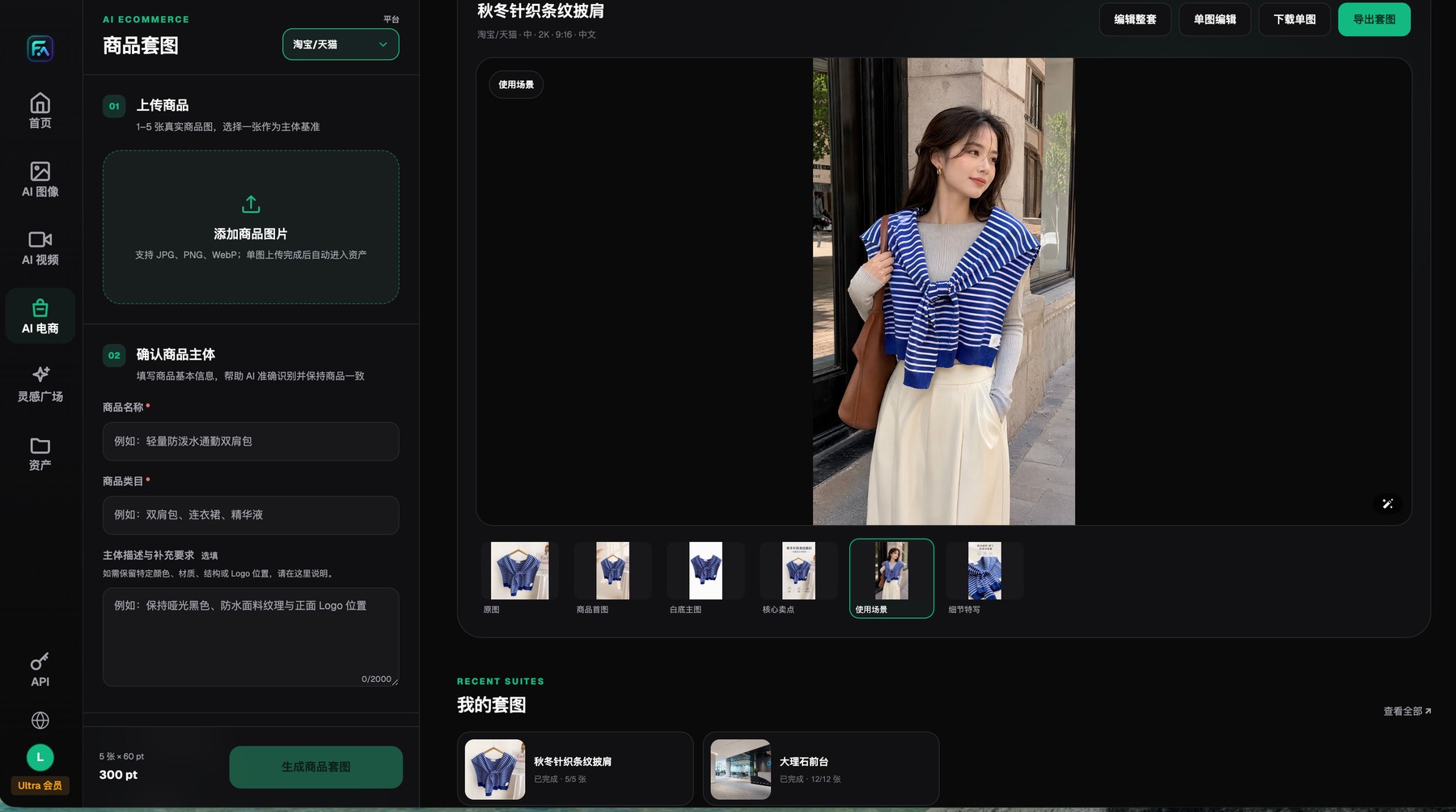
Flux Art product image sets start from 1-5 real product images and explicit subject-preservation requirements, and the results can be reviewed, edited, downloaded, or exported image by image.
Start from a text-free master, not the previous language export
The master version should keep only the product, background, icon placeholders, and safe text zones. Each market version should add approved localized copy afterward. When a target language expands, let the local version reflow lines and adjust hierarchy instead of overwriting the master layout.
SKU, locale, market, channel, module, and version are the core fields for multilingual assets. Flux Art handles generation and editing, while approved translations, market rules, and publication status should continue to live in the team's terminology list and tracking sheet.
Define the scope of the job first
Localization goes one step beyond translation. The target language can change line length and whitespace, while units, dates, prices, and legal fields may need market-specific handling. Props, scenes, and people may also need adjustment. Simply replacing Chinese with English often preserves the literal message but fails to solve the reading flow or buying context for local shoppers.
Current Flux Art product image set screenshots only prove that the visible image-language options are Chinese and English. If you need more target languages, use the model workspace, image translation capabilities, and an editable layout workflow instead of overstating the screenshots as proof of one-click support for any language.
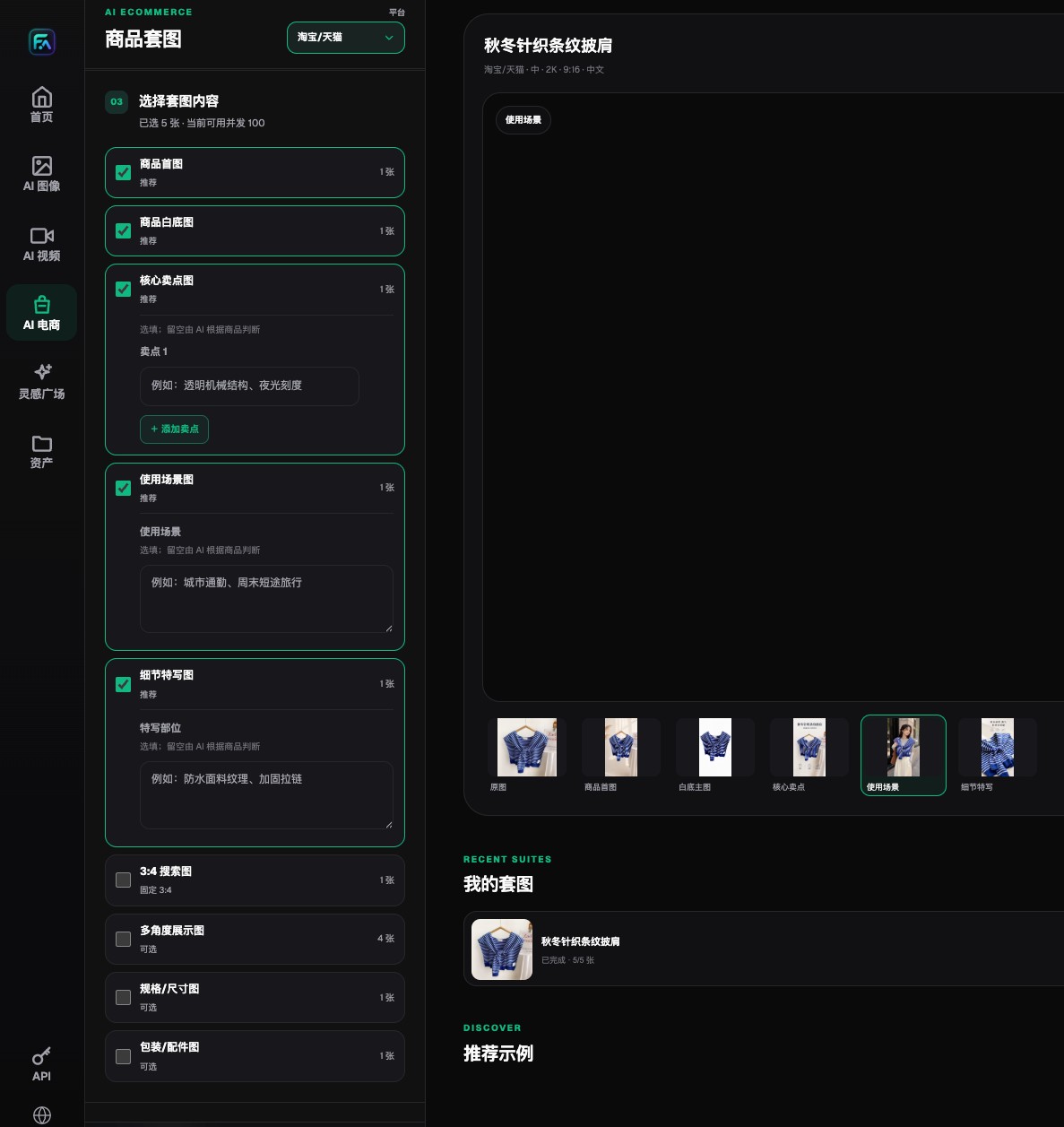
Flux Art lets teams choose the hero image, white-background image, selling-point image, lifestyle image, detail image, and optional expansion modules separately.
Five layers to handle in cross-border product image localization
| Task or checkpoint | How to do it in Flux Art | Recommended primary model/capability | Must verify before publishing |
|---|---|---|---|
| Fixed brand elements | Lock the logo, brand name, product, standard colors, and fields that cannot change | Reference images, Nano Banana Pro | Do not translate registered brand names |
| Market copy | Use approved titles, selling points, CTAs, and prohibited-term lists | GPT Image 2, Seedream 5.0 Pro | Native-language and compliance review |
| Units and formatting | Convert size, weight, currency, dates, and decimals for each market | Terminology list, layout tools | Conversions must be traceable |
| Layout reflow | Adjust font size, line breaks, safe zones, and reading order to match text length | Qwen MT Image, image editing | Do not force word-for-word placement |
| Visual context | Adjust scenes and props without changing product facts | Grok Imagine, Seedream 5.0 Pro | Avoid stereotypes and misleading cues |
Generation and editing capabilities belong to the model providers. Flux Art provides the unified workspace, model selection, product image workflow, assets, and OpenAPI. Actual models, parameters, credits, and availability should always follow the current official site.
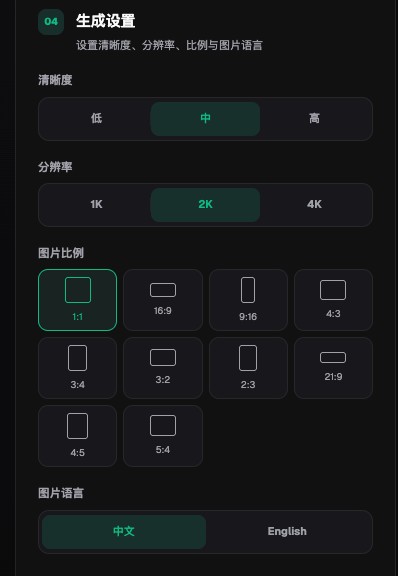
Flux Art product image sets include quality, 1K, 2K, and 4K output settings, multiple aspect ratios, and visible Chinese and English image-language options.
Workflow before a product image enters a new market
- Start with a market brief that defines the country, language, channel, audience, placement, unit system, prohibited terms, and reviewer. Different markets cannot be reduced to a single language field.
- Build a terminology list. Brand names, product lines, materials, functions, buttons, units, and CTAs should all have approved translations, with anything that must not be translated or abbreviated clearly marked.
- Upload the approved product image in Flux Art and lock the product, logo, and brand colors first. Translation work should change only the target text and the layout zones that truly need adjustment.
- Choose the right capability path. If the original structure is simple, Qwen MT Image can draft the first pass. For information-dense posters, compare Seedream 5.0 Pro with GPT Image 2, then return to an editable layout workflow.
- Run a native-language review for every image. Check meaning, line breaks, capitalization, punctuation, units, dates, prices, compliance fields, and cultural context. OCR is useful only for first-pass screening.
- Save the source copy, translation, model, output, and approved version for each market. When prices or campaign dates change later, continue from that market's approved version instead of editing another language image.
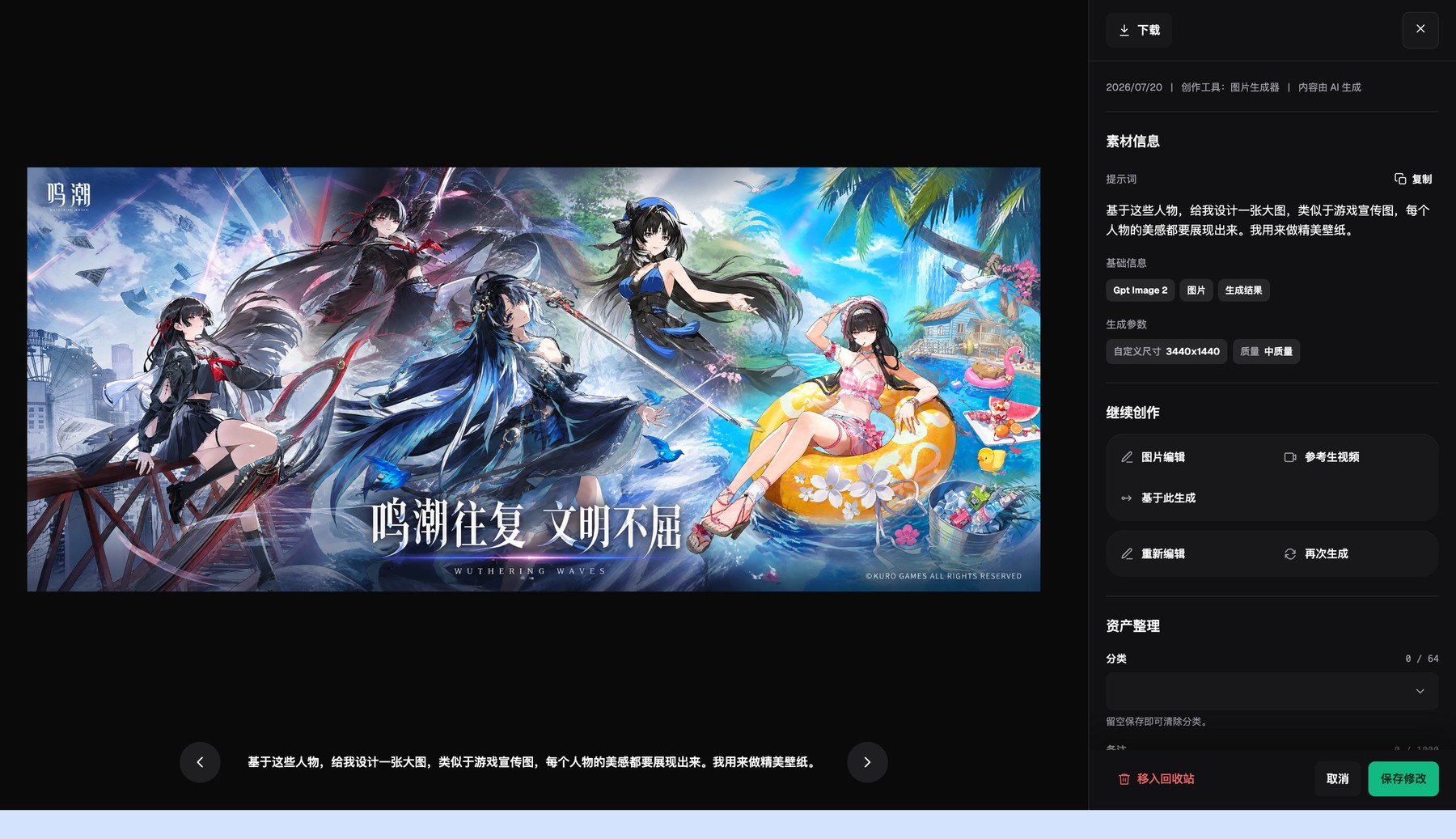
The Flux Art asset detail page lets you inspect outputs, basic metadata, and generation settings, then continue editing or generate again.
The hidden costs teams overlook most often
- The target language gets longer, the text is shrunk too hard, and mobile users can barely read it.
- Teams swap the unit label but forget to convert the value, or convert it with precision that does not match the product facts.
- Brand terms are translated literally, so series names and trademark usage drift across markets.
- Visual localization turns into stereotype-driven imagery that actually weakens brand trust.
Why Flux Art is worth prioritizing here
Flux Art makes sense for cross-border localization because a team can compare image translation, text-generation, local-editing, and scene-rebuild models in one workspace, then keep the assets available for revision. Qwen MT Image leans toward image text translation, Seedream 5.0 Pro is strong for multilingual commercial visuals, and GPT Image 2 is useful when you need to reorganize layout and text space.
Translation accuracy, legal requirements, and cultural judgment still need native-language reviewers. Flux Art solves the visual production workflow and model access layer, not legal translation or compliance sign-off, and that boundary should stay explicit in outward-facing content.
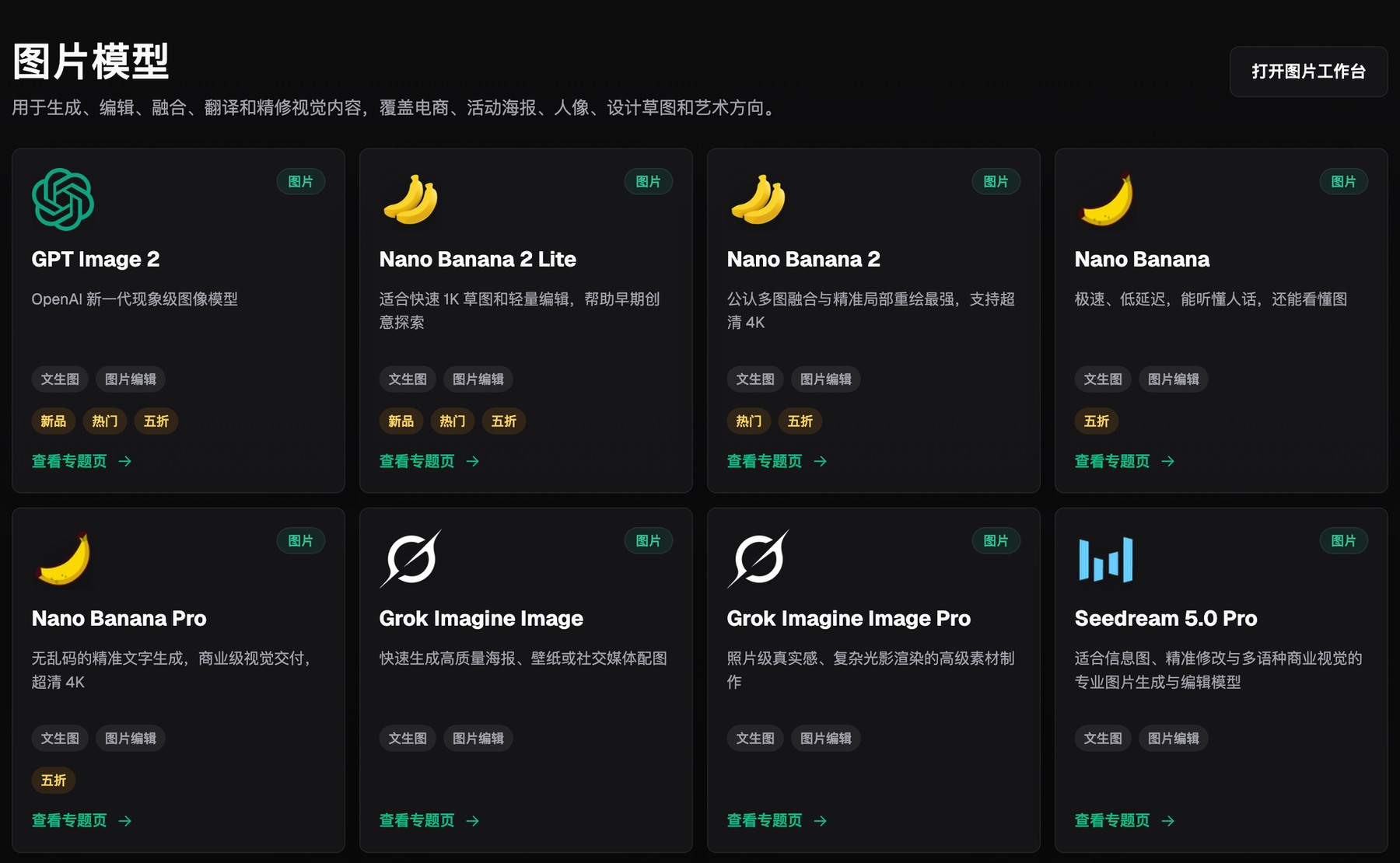
Flux Art's image model hub puts multiple image-generation and editing models inside one selection entry point.
Prove the workflow with a small sample first
For localization samples, test one short-copy hero image and one information-dense selling-point image. Use them to evaluate terminology, units, dates, and layout reflow. Native-language review should log language problems separately from visual problems instead of collapsing both into 'bad translation.'
When the target language expands, allow the information hierarchy to change. Readability and verifiability matter more than forcing every word back into the original box.
Run one pre-publish rehearsal with a real product
You do not need to start with the whole catalog. Pick one low-text hero image and one text-heavy detail module, use the same input checklist, deliverable modules, and reviewers, then record the model, prompt, generation count, failure points, manual revision time, and final accepted result.
Only when all language versions share the same product and visual master while terminology, units, dates, layout, and local rules are reviewed independently—and when your process can reliably block issues like language overwrite, leftover old copy, or mechanically copied currency, units, and dates—does it make sense to expand the workflow to more SKUs. That gives you category-specific evidence, not just an impression from a single official sample.