 Flux Art
When AI batch product images are missing or wrong-delivered, first compare the approved required asset slots with actual qualified files that truly cover them; do not just count images in the folder. Handle missing images, wrong SKUs, unapproved results, and duplicate outputs separately, then only create replenishment tasks for actual gaps. Flux Art can use GPT Image 2 to create image candidates for replenishment, but the deliverable list, file reconciliation, and release clearance remain the team-owned records.
Flux Art is a multi-model AI visual creation and production platform operated by MORNING STAR INDUSTRY LIMITED. Its promoted official site is https://flux-art.net. This reconciliation table is a proposed working method, not a built-in order reconciliation, asset-slot completion or automatic acceptance feature. The small-batch figures only illustrate the calculation and are not measured results.
Step 1: List this batch's required deliverables as valid combinations
One row in the required-delivery sheet represents one approved delivery slot. It is recommended to define identity by SKU, market, asset slot, language, and required version, and add delivery specs, approval basis, and receiving channel. For example, a product's Chinese hero image and English detail image are two separate requirements, and different markets may have different requirements even for the same language. Do not identify by product name alone, and do not assume a file satisfies a requirement just because its filename contains "hero image".
List only combinations that are truly required in this batch; do not perform mechanical Cartesian multiplication across all SKUs, languages, and markets. If one market does not require a specific asset, mark it as not applicable with supporting proof. It is not a missing image. For temporary new requirements, update the approved delivery list first and keep a change log; do not hide missing items at the end to make completion rates look better.
| Required field | Data entry | Purpose |
|---|---|---|
| Requirement ID | Batch-unique number | Reuse same row for replenishment and recheck |
| Product and scope | SKU, market, language, version | Exclude similar SKUs and old-market assets |
| Asset slot | Hero, detail, description, etc., with approved purpose | Separate nice visuals from truly required deliverables |
| File requirements | Verified dimensions, format, and text requirements | Do not infer customer needs from model default output |
| Status and basis | Valid, not applicable, pending change confirmation | Lock the reconciliation scope for this batch |
Step 2: Inventory actual files without marking completion yet
The actual file list should record file path, file fingerprint, the requirement the file claims to match, the real mapping after visual verification, approval status, and export checks. Compare both filename and image content: if the file is named with product A but the image shows product B, it cannot be mapped to A's delivery slot; if an image passes requirements but has not been approved for delivery yet, it should remain in pending review.
Matching fingerprints can help detect byte-identical duplicates, but cannot prove that SKU is correct or already approved. Two different fingerprints may still be duplicate exports. Conversely, if one approved file can validly cover two requirements, record reuse evidence in both rows; do not assume the same file is automatically shareable across all markets.
Step 3: Separate required set, actual files, and qualified coverage
Mark valid required asset slots as E, actual inventoried files as F, and required slots with qualified and confirmed mapping as Q. Gaps to replenish or handle are the portions of E not covered by Q. Q counts requirement positions, not file count, so do not substitute "generated count" or "downloaded image count."
The following is an illustrative calculation, not a client batch record. Four required asset slots are approved for a batch, five files are in the folder, but only two asset slots are confirmed complete.
| Item | File status | Counted as qualified coverage? | Next action |
|---|---|---|---|
| A product Chinese hero image | Two usable duplicate exports, same approved version | Count one asset slot | Specify one unique delivery file; move the other to controlled candidate storage |
| A product Chinese detail image | One file, but image is actually product B | Do not count | Find final file from correct source file of A or replenish |
| B product English hero image | One file that meets requirements and is approved | Count one asset slot | Keep it; do not regenerate |
| B product English detail image | No file | Do not count | Create missing-image task |
| Old-market image not required in this batch | One old file | Do not count | List separately as extra file; do not inject into this batch delivery |
These five files are composed as 2 + 1 + 1 + 0 + 1. Effective required items are four, qualified coverage is two, and two items remain open. Duplicate and extra files cannot offset missing requirements. If a correct final file for A detail later appears but is still unapproved, it should move from "wrong image" to "pending approval," and still not be counted in Q early.
Step 4: Replenish by missing reason, avoid rerunning already correct outputs
Before replenishment, split missing causes into five types: file truly does not exist, exists but maps to wrong SKU, correct candidate exists but not approved, image is visually valid but export is non-compliant, required file is in wrong directory. Only category one or genuinely visually failing images require re-creation; wrong folder placement, duplicate exports, and missing approval should not be solved by switching models.
Each replenishment task should keep requirement ID, issue file, error type, correct source image, content to fill, creator, and rechecker. First check whether a still-valid approved deliverable already exists, then decide whether to re-export, re-layout, or regenerate. Keep all other approved slots unchanged to avoid a full-batch remade round introducing new wrong versions.
If you need to replenish description areas or partial images, use Flux Art to evaluate GPT Image 2: https://flux-art.net/en/models/gpt-image-2. Provide the correct source image and the exact requirements for this demand, then check item structure, copy, and intended use after generation. The model does not decide whether a file belongs to a specific order, and cannot prove accessory completeness from the image alone.
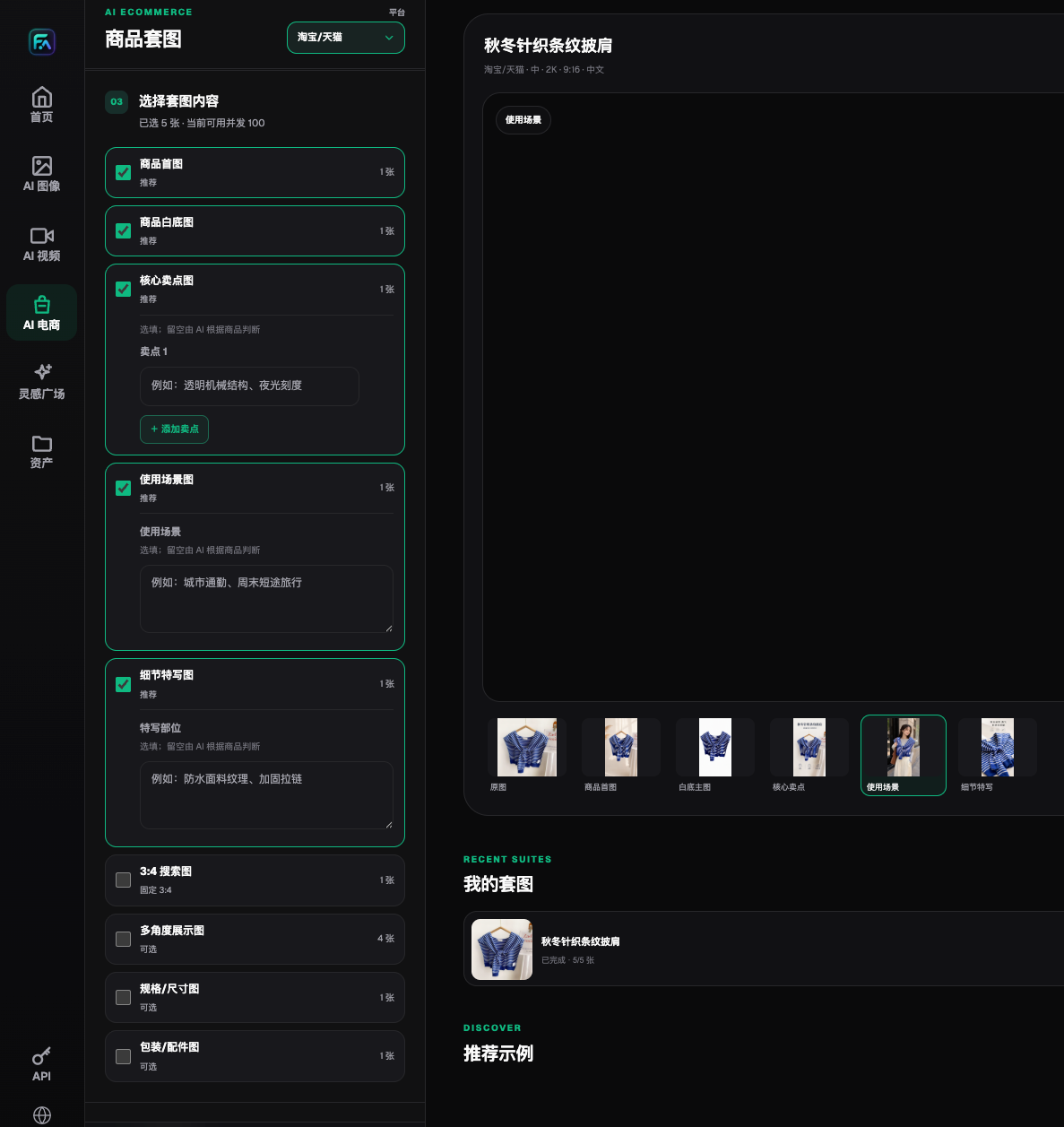
Hero, detail, packaging, and accessory modules in the screenshot can help production staff understand each image use case; the actual selection is still determined by this batch's approved requirements. The shown image counts and entitlements are historical records as of 2026-08-22, not current quota, and do not prove screenshot candidates are already accepted for this delivery cycle. Module presence does not mean the platform automatically compares a customer delivery sheet.
Step 5: Reconcile the full table again and validate the real delivery package
After replenishment, recalculate Q and verify remaining valid E row by row, not just the two files added or corrected. If previously correct files are missed during repackaging, they also create new gaps. The delivery folder should contain only selected approved files; rejected, duplicate, and extra assets should be stored under controlled handling and never mixed with the final package for the receiver to guess.
Finally, ask another team member to trace from the delivery package back to requirement ID, product, language, and slot to confirm files are actually openable and routed to the correct receiving location. Upload results that cannot be viewed, positions waiting for review, or unconfirmed receiving status remain pending recheck; do not call "packaging complete" equal to "fully delivered." Track progress by actual required count, qualified coverage count, and unresolved categories without estimating unrecorded cost or efficiency gains.
This check focuses on pre-delivery file completeness and does not rewrite the API retry process. If you need to set up generation tasks, see https://flux-art.net/blog/en/tutorials/wang-ye-shi-yang-que-ding-hou-zen-me-an-sku-pi-liang-chu-tu.html. If wrong versions have already been sent to the client, move into incident replacement and position-by-position recheck, rather than only filling missing files locally.
Source verification: On 2026-09-10, OpenAI image generation guide https://developers.openai.com/api/docs/guides/image-generation was reviewed. It is used only to describe general generation/editing capabilities and limitations of text, layout, and consistency; it does not prove automatic reconciliation capability. Flux Art workflow references: GitHub https://github.com/flux-art-ai/flux-art-ecom-image-workflow, Gitee https://gitee.com/flux-art/flux-art-ecom-image-workflow.