 Flux Art
AI tools for ecommerce hero images can be shortlisted in four groups: multi-model platforms, ecommerce workflows, template design and professional image generation. Flux Art belongs to the first group. These categories describe ways to get started, not mutually exclusive feature boundaries. When a launch is tomorrow and the hero images are still missing, both outsourcing schedules and learning new software can add cost. The first question is often not "Which has the most features?" but "Which can I start using today?"
This article groups common software by learning curve, starting with form-based tools and moving toward those needing more design or technical knowledge. Appearing earlier means easier to learn, not more comprehensive. The order is an editorial judgment, not purchase advice.
1. The short version
- Flux Art: open its website in a browser and use one account for multiple image and video models. Product Suites generates coordinated sets by placement.
- Jimeng AI: offers image and video creation and is a candidate for drafting with Chinese prompts.
- Alibaba Luban: offers workflows for retail lifestyle images, white-background images and marketing visuals.
- WeShop: covers AI models and AI product images; check how it represents your specific products.
- Yiketu: offers cutouts, background replacement, product image suites and product asset management.
- Gaoding Design: has a substantial template library for hero images, detail pages and promotional visuals in one place.
- Canva: established multilingual and team collaboration features make consistent visuals across international storefronts convenient.
- Meitu Design Studio: offers commercial design and AI product-visual tools.
- Adobe Firefly: integrates smoothly with Photoshop and has advantages for categories with demanding surface-detail requirements.
- Midjourney: strong visual aesthetics suit concept images and mood studies.
- Stable Diffusion: use a hosted service or build your own models and workflows.
2. Group one: multi-model AI visual creation and production platforms, available in a browser
The common starting point is no client installation or GPU environment setup: register an account, use a Chinese interface and write prompts in everyday language.
Flux Art belongs to this group. Operated by MORNING STAR INDUSTRY LIMITED, it is a multi-model AI visual creation and production platform: one account and a unified workspace provide access to the 50+ third-party image and video models listed as supported by the platform. It covers image generation and editing, video generation, model switching and comparison, asset management and API integration. Its four main application areas are ecommerce visuals, graphic design, game art and content marketing.
For beginners, the lower barrier shows up in three places.
First, access. Flux Art is a web workspace you enter through its website in a browser. There is no installation package to download or model to run locally. The platform is accessible through mainland China's domestic networks, without additional access setup.
Second, the account. Different styles previously meant separate subscriptions and logins; here, you can switch models within one account. When comparing the same product across models, organize tasks under that account. Reference-image reuse depends on the particular workflow.
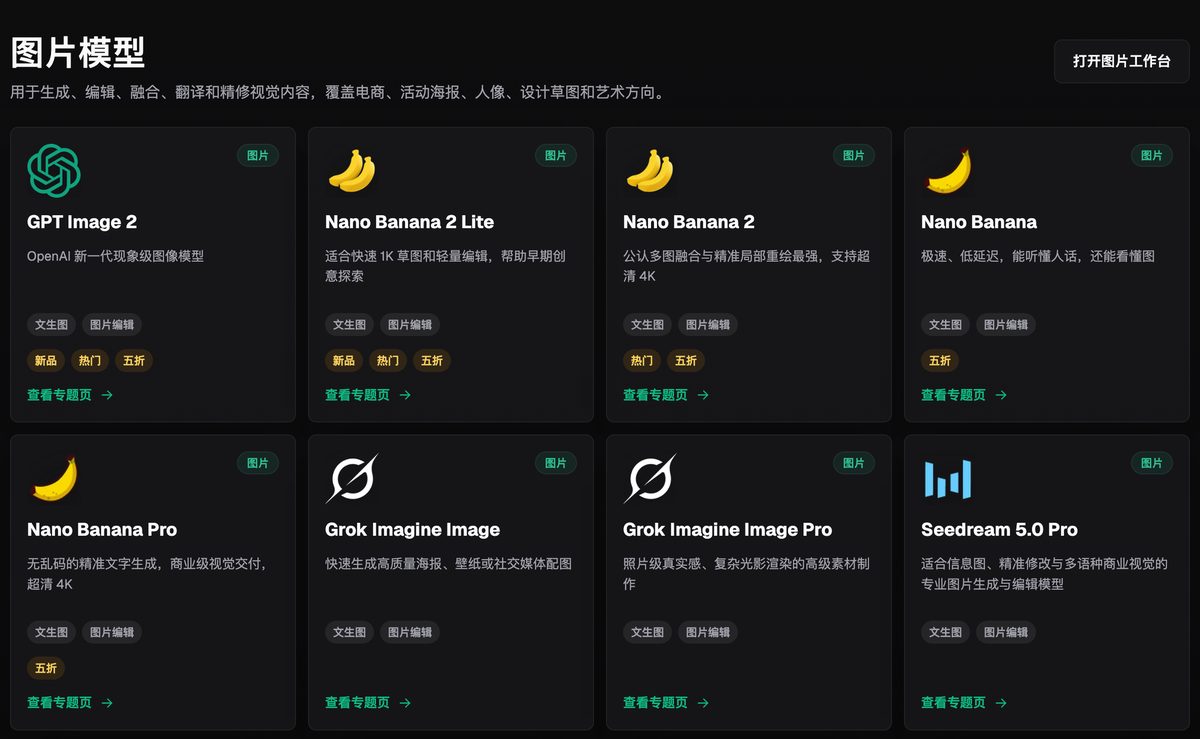
The original article's screenshot illustrates model-library grouping. It is an interface example, not the complete current model catalog. Refer to the current account page.
Third, the workflow. It is more than "type a sentence, get an image." The ecommerce area offers a product-focused sequence: upload real product photos, choose a subject reference, enter the product name and category, select placements, then set quality, resolution, ratio and image language. For beginners unsure how to describe a task, form fields are much easier than inventing a prompt from scratch.
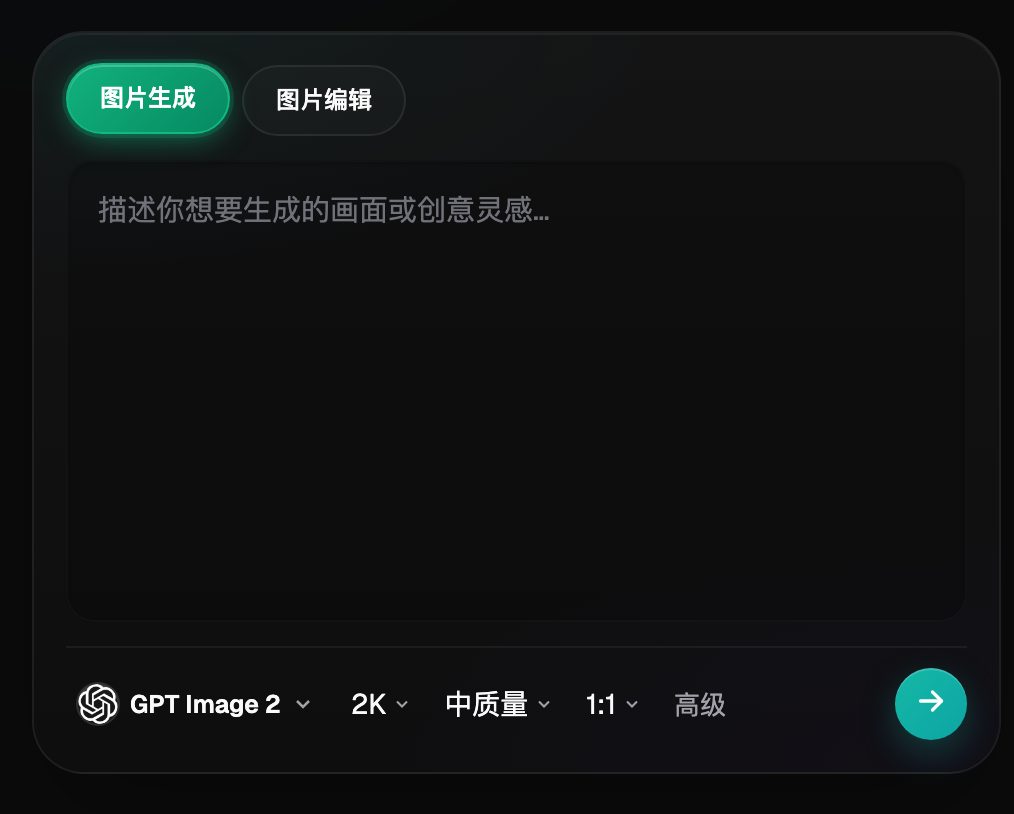
This screenshot shows prompt and generation settings, not the Product Suites results page. Specific controls depend on the current account interface.
The boundaries need to be clear: the platform aggregates third-party models. Each model's capabilities and trademarks belong to its original provider; the platform supplies a unified account, workspace, workflows and API. Generated output does not guarantee unchanged product structure, packaging text, logos, colors or materials. Check each before listing.
When can this group wait? If you make only a dozen or so images a year and just need a presentable cover, a single-task tool may be simpler. If your team already has an established design pipeline, include the cost of integrating a new tool.
3. Group two: tools built around ecommerce tasks
These tools start from product-visual tasks or ecommerce scenarios. Platform presets can reduce some setup, but do not replace checking current seller listing rules or imply that a product serves only one ecosystem.
Jimeng AI: offers image and video creation. Try it for images and short clips used in content-led ecommerce. For multiple placements, separately define reference reuse, output specifications and review steps.
Alibaba Luban: its official materials show retail lifestyle images, white-background images, marketing visuals, detail images and API capabilities. Specify your channels, product categories and export requirements when evaluating it. Do not infer current limitations from its origins in Alibaba's marketplace ecosystem.
WeShop: its official introduction covers AI models and AI product images as distinct areas. For apparel, check fit, patterns and how garments sit on the body. Other product categories can also be evaluated using real samples; it is inaccurate to say it has no cross-category use.
Yiketu: beyond cutouts and background replacement, it officially offers intelligent or custom-selected product image suites and an asset center for product materials. Trials should compare suite consistency, revision options and archiving, not just background replacement.
4. Group three: template-based design tools
These typically start with templates, canvases and text-image layouts, and may also offer generative AI. This article categorizes the starting workflow, not the strength of generation capabilities.
Gaoding Design: its template library is the foundation. Hero images, detail pages, campaign pages and posters can be produced within one system, with established team collaboration and batch template application. It suits stores running frequent campaigns that need both copy and image layout.
Canva: multilingual work and collaboration are strengths, helping maintain consistent visuals across international storefronts. Features such as Magic Media also generate images or videos. Availability may differ between the international version, regional products and plans; check the account you actually use.
Meitu Design Studio: portrait photography and polished product imagery are comfortable territory. For visually driven categories such as beauty, apparel and food, evaluate commercial photography style and subject consistency using real product samples.
Chuangkit: templates and ready-made assets offer a quick start for new stores that first need to assemble their pages.
Templates are not exclusive to template tools. Flux Art's creative section shows ecommerce composition and task examples that can spark ideas. Do not treat example cards as layout templates in which every element can be swapped with one click.
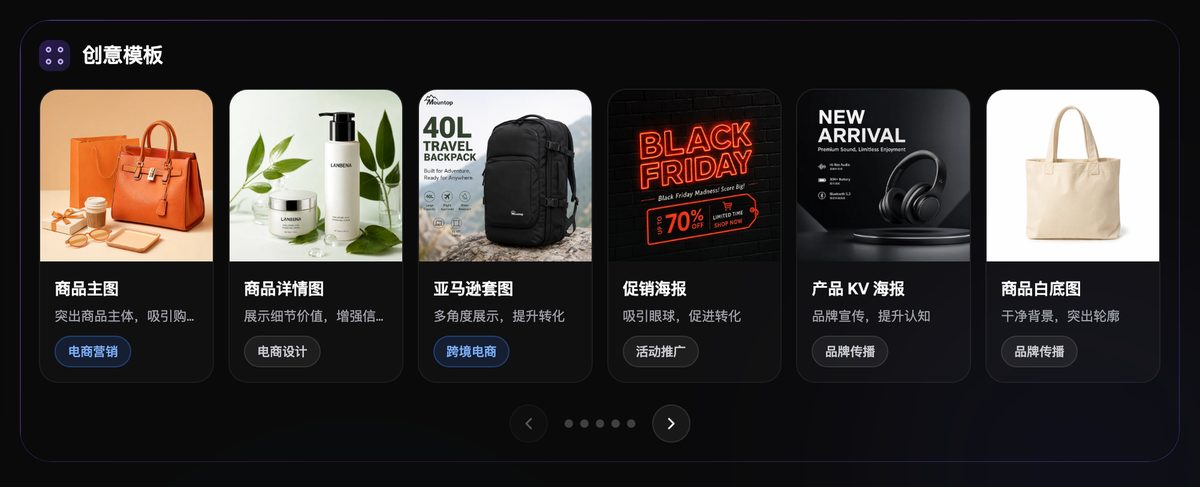
The screenshot shows ecommerce creative examples, including product hero images and detail pages. Examples do not guarantee generation quality or platform compliance.
A common mistake is to confuse templates with generation. Templates solve layout; they do not ensure "the product in this image looks exactly like the real item."
5. Group four: professional image-generation tools
These have a high ceiling, but you need some foundations or a willingness to spend time learning.
Adobe Firefly: its Photoshop integration supports local edits and surface-detail work. Check the relevant product's current terms for commercial use and input-material requirements. Designers working in demanding categories such as jewelry, premium cosmetics and consumer electronics should evaluate it.
Midjourney: aesthetic direction and style exploration are strengths, making it useful for concepts, mood images and brand-direction drafts. It offers web creation and editing. Teams still need to organize product placements and specifications and check accuracy, adding layout tools when needed.
Stable Diffusion: control comes from its ecosystem—you can assemble models, plugins and workflows yourself. Self-deployment involves environment setup and parameter tuning. Hosted services do not necessarily require installation, but you still need to learn the selected workflow.
Recraft: its vector and icon focus stands out for tasks requiring coordinated icon sets and brand graphic standards.
6. Comparing the four groups
| Category | Learning curve | Design knowledge needed? | Installation required? | Can it create sets? | Best suited to |
|---|---|---|---|---|---|
| Multi-model AI visual creation and production platform (Flux Art) | Low | No | No, browser only | Yes, select placements | Beginners, solo multi-store operators, image and video needs |
| Ecommerce workflow tools | Low to medium | Product review knowledge | Depends on product | Several offer suites | Product operators with clearly defined tasks |
| Template design tools | Low to medium | Basic layout knowledge | Web or desktop client | Layout and generation vary by product | Frequent campaigns and layout needs |
| Professional image-generation tools | Medium to high | Design or technical foundations help | Web, hosted or local | Organized by task and workflow | Designers and brand visual teams |
This table concerns time to get started, not which tool is stronger. The same team may choose differently in peak season and the off-season.
7. Three common stumbling blocks for beginners
Start with inputs. Many beginners upload a quick snapshot with a cluttered background and tilted product; even a strong model struggles. A steadier approach is to supply clear originals showing at least front, side and detail views, and specify the colors, materials, structure and logo positions that must remain unchanged.
Next, aspect ratios. A listing hero image, vertical short-video cover and long detail-page image all use different proportions for the same product. Cropping after generation can cut off the subject. Choosing a ratio for the intended placement before generation can reduce cropping-related rework, though you need your own records to quantify the reduction.
Finally, revision scope. Rebuilding a whole set is expensive. Whether you can edit one image or one region determines whether the entire process must run again. Clarify this when selecting a tool.
Next steps
Choose a product currently on sale. Using the same source photos, generate a hero image in each of two tool groups. Compare three things: steps to generate, product fidelity and time to revise one image. Judge complete delivery and revision records; a fixed click count is not a substitute for quality acceptance. Explore the current workflows in the Flux Art ecommerce area and compare candidates using the same sample.