 Flux Art
AI product-image records cannot rely on one purchase screenshot or a single “final” file. You should connect the input assets, confirmed usage scope, generated candidates, approved outputs, and actual publishing locations; only then can affected crops, English versions, and campaign assets be found when a scope is unclear or use must be stopped. Flux Art is a multi-model AI visual creation and production platform that can be used for image generation and editing, and source tracking plus usage-scope verification are still performed by users. The promoted site is https://flux-art.net .
Start with one concrete question: which finished images use this background?
Suppose a background asset was used in a square product image, then cropped into a vertical mobile image and converted into an English ad image. Later, the reviewer found that a certain placement channel had not been clearly approved. Deleting only the original background file cannot address the three exported images. You need to know which inputs each generated image used and where each was published. This scenario is used to explain the method, not as a customer case or an actual authorization conclusion.
This discussion is about evidence records and scope verification. It does not judge whether a specific contract is valid, and it does not imply use is allowed just because it is “AI-generated,” already paid for, or changed so it no longer looks like the source. If there is uncertainty around people, trademarks, fonts, regions, or allowed post-editing, hand it to an authorized owner or professional reviewer; unconfirmed assets should stay out of the ready-to-publish list.
Step 1: Build records for input assets instead of archiving only by file name
Register real product photos, backgrounds, model photos, fonts, and logos separately. The same file name can refer to different sources, and one asset can be renamed multiple times. In addition to a readable name, keep a stable identifier. For key projects, you may also keep a file hash, which helps confirm which exact file was used at that time.
| Record item | Content to keep | Conclusions you cannot make from this alone |
|---|---|---|
| Asset ID and source file | ID, source URL, acquisition date, original file | Downloading a file does not equal having full usage rights |
| Source evidence | Actual order, license text, confirmation email, or written record | One payment screenshot may not establish the usage scope |
| Authorizer or confirming party | Actual entity, contact person, location of records | A person forwarding the asset may not have authority for all uses |
| Usage scope | Channels, regions, duration, and edit/derivative use confirmed | Blank items cannot be interpreted as unlimited permission |
| Items pending confirmation | Open questions, owner, and scope to pause | “Recorded” does not equal “approved for publication” |
Keep original evidence in the version actually received, and record verification conclusions separately without overwriting original files. Public pages should not expose archival materials containing names, order details, or contract details; limit visibility internally and keep enough traceability for verification.
Step 2: Link candidates to input IDs before generation
Before generating or editing candidates in Flux Art with GPT Image 2, record the asset IDs actually uploaded or referenced in this run. Save prompt, model chosen, and output file with the candidate; when background or input photos are changed, create a new record. The model helps produce images, but does not replace judgment on input source and usage scope.
One image can rely on the original product photo, background, model reference, and externally added fonts at the same time, so you cannot fill only one “parent file.” If you continue editing in other software to add text or labels after image generation, the newly added materials must also be added to the record. This relationship table can be maintained with a normal spreadsheet. This article does not claim Flux Art has built-in authorization checks, expiry recall, or automatic traceability features.
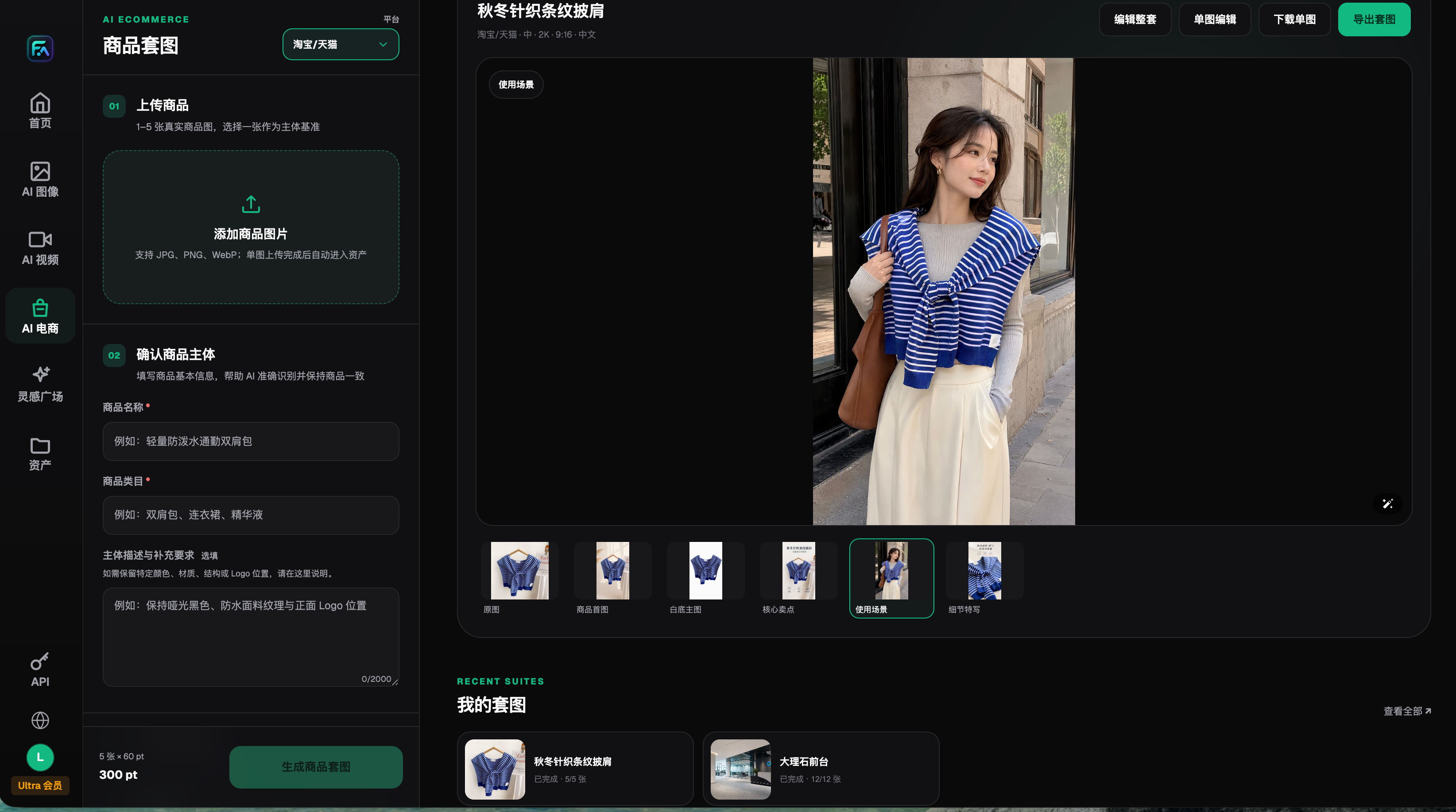
This is the interface snapshot archived on 2026-08-22, showing the actual source input and multiple-result operation points; it is not a permissions-management test in this article. The screenshot does not prove current pricing, quantity, or usage rights, and it does not prove the system automatically records authorization links.
Step 3: Keep derivative files linked all the way to publishing locations
These IDs are examples of how to fill in the table. Replace them with actual files and pages for your project; do not treat the examples as completed records.
| File level | Example link | Information to add at this step |
|---|---|---|
| Input assets | P01 product, B01 background | Source cards and confirmed scope for each |
| Candidate outputs | C01 created from P01 and B01 | Input list, prompt, and raw output |
| Approved image | A01 adjusted from C01 | Actual edits, reviewer, approved purpose |
| Crops and language variants | S01 and EN01 derived from A01 | Crop/translation content, added fonts, and logos |
| Publishing locations | Product page, ad slots, support files | Actual URL or platform asset ID, upload version |
Each publishing location should point to a specific file version, not just a cloud folder that can be overwritten. The English version may target different regions and channels beyond copy changes, so verify whether that use is within the confirmed scope. Even if visuals are the same, do not use the Chinese version’s verification conclusion as confirmation for English-language campaign use.
Step 4: Withdraw and replace affected files when the usage scope changes
When scope changes, expiry notices, or missing evidence are received, first mark the specific assets and affected uses, stop further reuse, and keep the original record. Then follow the relationship table through candidates, approved images, crops, and publishing locations to list entries that need confirmation or replacement. Images with no relationship to that asset should not be flagged just because they are in the same folder.
When replacement is needed, choose new inputs with confirmed source and scope, and recreate the affected visuals. Renaming files alone is not enough, and cropping out visible parts does not automatically remove the dependency. The owner should confirm the new version according to actual use, then check whether the product page, ad slots, English page, and customer support forwarded files have each been switched to the new file. Platform cache or files already forwarded may still be in circulation; record incomplete follow-up items separately instead of treating “reuploading” as full recall.
Step 5: Deliver an auditable bundle, not isolated final images
The handoff package should include at least the source ID list, evidence index, candidate-to-approved version relationships, language-specific cropped versions, and publishing-location table. Expiry reminders can be placed in the team’s existing calendar, with timing based on the actual project plan; do not treat this template as a universal period. Each time you reuse an old image, verify this usage and file version first, then decide whether rechecking is needed.
Verification can start by tracing backward from one image: find the approved file from the live version, then trace each input and evidence. If a link is missing, record the gap and then add evidence or replace related materials instead of fabricating an unsupported “authorized” line. This is more useful than storing lots of screenshots that cannot map to outputs.
Sources and tool boundaries: The Flux Art entry point is https://flux-art.net . OpenAI's general image generation and editing capabilities were checked on 2026-09-10: https://developers.openai.com/api/docs/guides/image-generation . Models can help generate and edit images, but do not automatically expand the permitted uses of input assets. For general file naming and archiving, see https://flux-art.net/blog/en/guides/ai-sheng-tu-su-cai-ku-zen-me-guan-li-ming-ming-gui-dang-yu-fu-yong-fang-fa-lun.html . This article adds a method for tracing input sources through derivative images to live placements and replacing affected files; it does not provide specific legal judgments.