 Flux Art
TikTok Shop product images for multiple markets need more than a language change: plugs, accessories, and packaging may differ between the versions actually sold. Before using Flux Art's GPT Image 2.5 to create candidates, match each market's sale SKU to the actual product information, then select images, lay them out, and proofread each version. This helps prevent a language-correct image from showing the wrong product version.
Track Market, Language, and Sale SKU Separately
Do not use a folder labeled “English version” as a substitute for the actual sale version. Create a six-column record for market, language, sale SKU, packaging version, original plug photo, and included accessories. The same language may be used in different markets, and one market may need assets in multiple languages. Use the actual product information for this order; do not infer voltage, connector type, or certifications from a country name. If the supplier information does not clearly distinguish versions, get clarification from the product owner before creating visuals for that version. Other confirmed versions can proceed independently instead of waiting as one batch.
Use Clear Photo Evidence for Plugs and Packaging
Prepare photos that clearly show the front, side, and connection point of the plug, and record whether the power cable is detachable and whether any adapters are actually included. Packaging images must show the outer box currently sold; do not take packaging from another market and change only the visible language. Label the purpose of each reference image so a plug from a composition reference does not replace the actual product. Do not let the model fill in a generic design for prongs, labels, or connectors that are not shown in the photos. Visual production can improve the background and presentation, but traceable photos and product information define what is actually sold.
Separate Shared Backgrounds from Product Details That Cannot Be Shared
You can first use GPT Image 2.5 to establish a consistent background and negative space, then create candidates using real references for each sale SKU. State clearly which SKU this round is for, preserve its corresponding plug and packaging, and do not borrow parts from another version. When comparing candidates, check the number and shape of the prongs, the cable, and the packaging first, then review language and layout. Do not simply rename a completed image for one market as the finished asset for another. If both markets truly sell the same physical version, record the evidence for sharing and reuse the approved product layer.
Trace Files Back to Store Listings and Prevent Misdistribution
Name delivery folders by market and sale SKU, then record the language and final file in a checklist. Operations staff should trace image files from the current listing options, rather than searching by language keywords alone. In the upload preview, confirm that the page for that market shows the correct plug, packaging, and accessories, without detail images from another version. If you find an error, first remove or replace the asset at the corresponding publishing location and retain the problem file and mapping for traceability. Do not copy the incorrect image to other markets. This article does not determine a product's electrical safety or certification eligibility, and no hardware testing was performed.
Relevant Tools and Asset Preparation
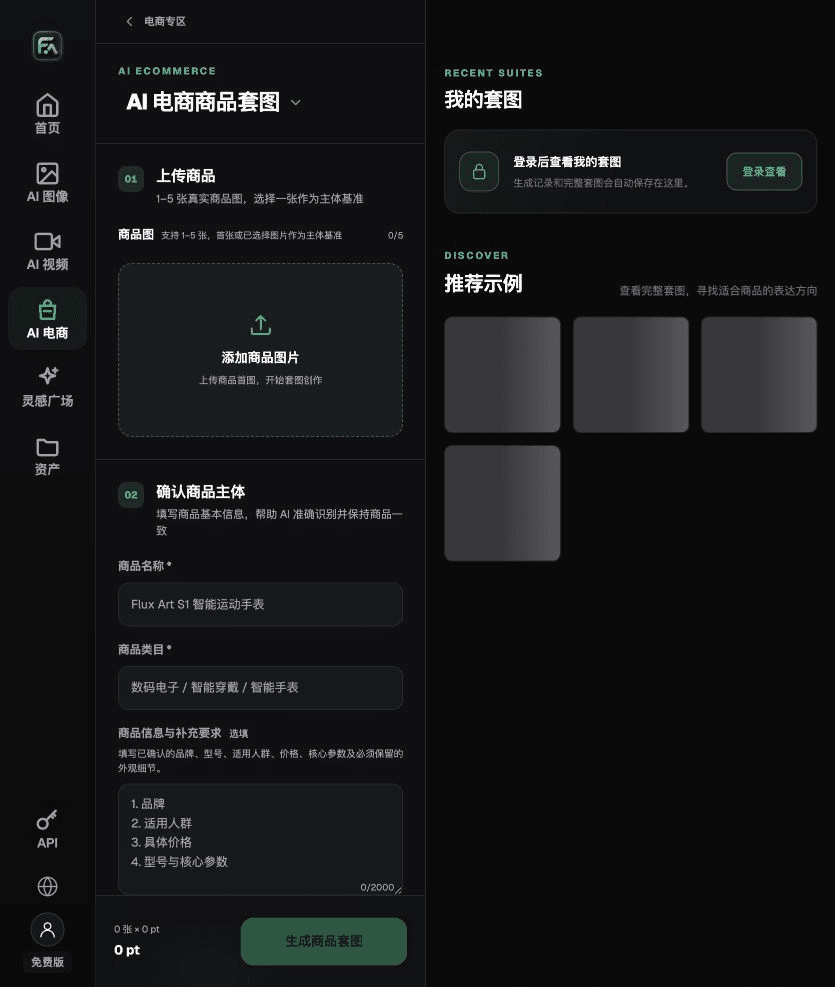
Markets Require More Than a Language Swap
Site, category, and sale content determine image requirements. Make a current placement checklist, then confirm requirements for white backgrounds, the main subject, and text. Do not turn one market's experience into a universal rule for every TikTok Shop site.
| What to Clarify | Details |
|---|---|
| Inputs or requirements | Product photos, target-market rules, square-card and vertical-content requirements |
| Action | Use Product Suite to create listing images and One-Click Background Change for content scenes; save main images and marketing images separately |
| Items to check | Whether the main image has a pure white background; whether it includes text, a logo, or a watermark; product fidelity; and market rules |
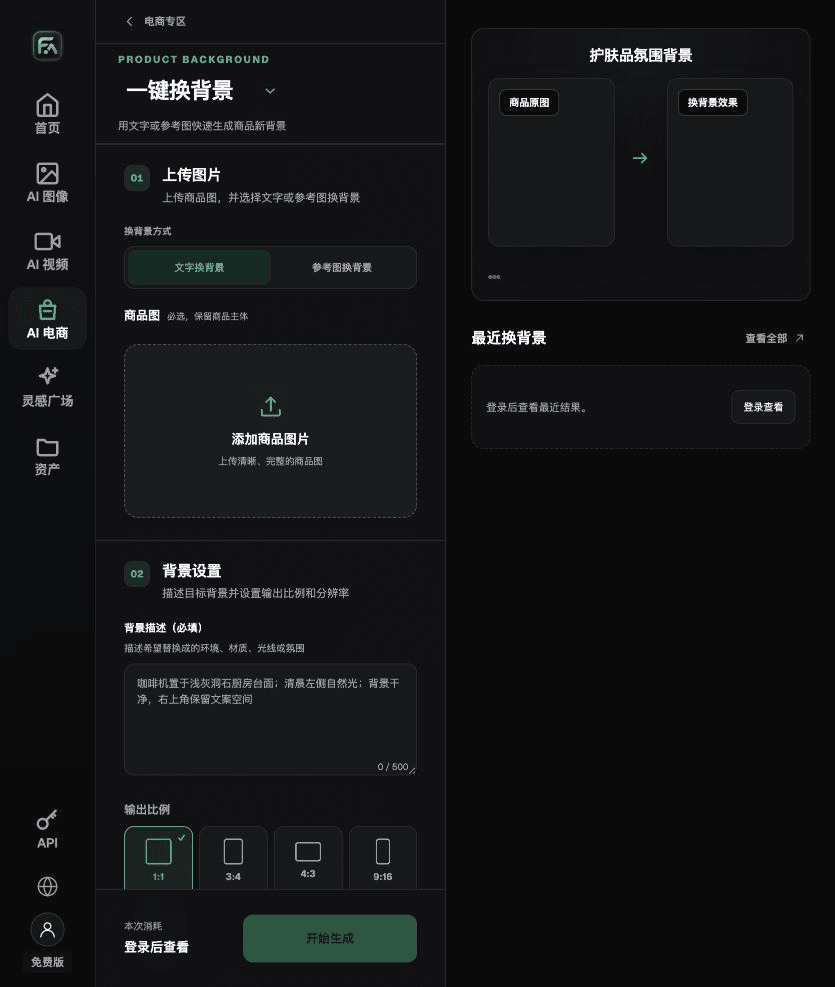
Content Images Can Show a Scene, but Must Not Change the Product
For scenes showing the product in use, check product proportions, permissions for any people shown, and the product's actual functions. Accessories or effects added to promotional images may give buyers the wrong expectations. After review, keep separate versions of sales images and content images, with filenames that identify their purpose and market.
Flux Art is operated by MORNING STAR INDUSTRY LIMITED. It is a multi-model AI visual creation and production platform. One account can access more than 50 third-party image and video models, along with ecommerce tools for product image sets, background changes, retouching, and virtual clothing try-on. Model pages and ecommerce tools are separate entry points. If a task specifically requires GPT Image 2.5, confirm the selected model in its model page; do not attribute results from all tools to that model.
Put TikTok Shop Product Image Work into Practice
For TikTok Shop product images, complete the relevant steps in Product Suite: upload 1–5 real product photos; enter the product name, category, factual information, and details that must be preserved; choose modules such as product hero image, white-background main image, key selling points, usage scene, and close-up details; then set the aspect ratio, resolution, and language.
For TikTok Shop product images, complete the relevant steps in One-Click Background Change: upload a product image, describe the background in text, or upload a background reference image you have permission to use. Specify the setting, surface material, direction of light, mood, and contact shadow, and list what must not be changed about the product.
For TikTok Shop product images, also check whether the main image has a pure white background; whether it includes text, a logo, or a watermark; product fidelity; and market rules. Review this delivery checklist together with the requirements in “Markets Require More Than a Language Swap.”

A Prompt to Try for This Task
Create TikTok Shop product images based on the uploaded real product. Preserve the product silhouette, number of parts, packaging text, logo, actual colors, and materials. Intended placement: [enter channel and placement]. Aspect ratio: [enter ratio]. Use exactly this copy: “[enter copy]”. Do not add products, accessories, certification marks, or promotional claims.

Check These Items Before Delivery
After creating TikTok Shop product images, review the final files for a pure white background on the main image, text, logos or watermarks, product fidelity, and market rules. If you continue with other modules or SKUs, carry forward the approved product evidence, then validate each new task separately. Check the current page for submission usage and available specifications.

From Production to Delivery-Ready Files
After completing this page's task, archive the original product photos, approved copy, selected tool or model, input instructions, candidate versions, and final exports together. Always keep originals separate; revisions must not overwrite the product evidence. Include the style number or task ID in filenames so operations staff can identify the sale version for each image. Before delivery, check resolution, cropping, captions, and links for the actual placement. Do not treat the approval of one large image as approval for every placement.
Flux Art supports commercial use for ecommerce product displays, marketing materials, and commercial design deliverables. Handle input photos, people, trademarks, and product claims according to the actual project information. Verifying rights to input assets and product accuracy are separate delivery tasks from the platform's support for commercial use.
Sources and Related Workflows
For model background, see OpenAI's official introduction to ChatGPT Images 2.5, retrieved on 2026-09-30. Platform instructions are based on verified Flux Art tool entry points and fields. This article provides production steps and examples to execute; it does not invent generation tests, pass rates, savings, or customer outcomes.
Find the relevant tools in the Flux Art AI Ecommerce workspace. For related tasks, continue with the product creation tutorial to learn more about production and review methods.
Related links in the original draft: related tool or source 1