 Flux Art
If you want to integrate GPT Image 2.5 into your own tool, first check the actual model IDs available for your account from the Flux Art OpenAPI model catalog, then submit one image task with a backend key, save the task ID, and query the result. Do not pass OpenAI model names directly as Flux Art API parameters, and do not treat queued as already finished.
This guide breaks the first request into verifiable steps and is suitable for readers who can use an HTTP client but have not used asynchronous image APIs yet. It is an integration guide organized from public documentation, not a measured report from a paid live call; example keys and model IDs are placeholders. Whether a specific model is open, which parameters are allowed, and how billing is applied should be confirmed in the actual account catalog and pricing notes.
1. Separate the web creative entry from the API
Flux Art is a multi-model AI visual creation and production platform operated by MORNING STAR INDUSTRY LIMITED, aggregating third-party models and creative tools, and is not a developer of GPT Image 2.5. Model descriptions on the webpage cannot replace pre-call verification of permissions, parameters, and model IDs.
Flare and Sunburst are different options published by OpenAI for GPT Image 2.5. For first integration, pick one version that is truly available in your current catalog and suitable for your task, and do not try multiple models with complex edits at once. Model topic page: https://flux-art.net/en/models/gpt-image-2-5 .
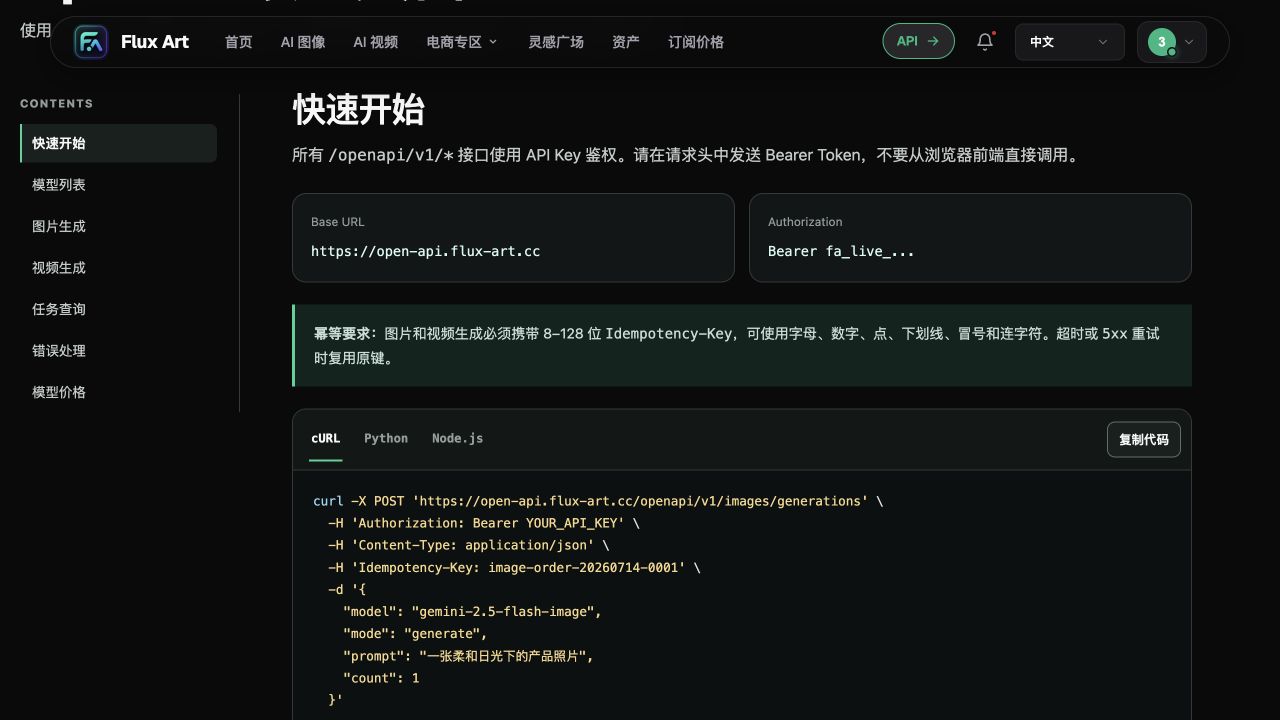
The recommended main site is https://flux-art.net . The full OpenAPI public base is https://open-api.flux-art.net/openapi/v1, not a path appended by guessing on the public website domain. The website is for viewing docs, managing accounts, and checking available items; backend services should hold keys, initiate requests, poll tasks, and store results.
2. Step one: establish the request basis from the catalog
From a controlled backend environment or an HTTP client that does not leak credentials, send GET /models as documented and set Authorization: Bearer YOUR_API_KEY. This path is relative to the full public base above. Never put a real key into web JavaScript, public repositories, screenshots, or frontend request logs.
After you find the target model returned by the API, record its ID, supported modes, and parameter constraints. If the current catalog does not include the required version, stop submitting that model and re-check your account availability first. Do not keep retrying by guessing an ID based on webpage titles. This article does not provide hard-coded GPT Image 2.5 IDs without account-catalog confirmation.
| Pre-check before request | Correct approach | Common misunderstanding |
|---|---|---|
| Service endpoint | Use the published OpenAPI base | Treat web page URL as API endpoint |
| Model identifier | Copy the actual ID from current catalog | Copy vendor brand name directly |
| Credential handling | Store Bearer key in backend | Give key to browser |
| Input mode | Check generate or edit against catalog | Mix fields without verification |
| Quantity and cost | Request one image first and verify billing | Run bulk stress tests immediately |
3. Step two: submit one simple image first
Submit JSON to POST /images/generations. Set Content-Type: application/json, Authorization, and Idempotency-Key. An example payload is: {"model":"YOUR_MODEL_ID","mode":"generate","prompt":"A light blue ceramic cup on a pale wood table, morning light, blank space in the upper left, no text","count":1}.
YOUR_MODEL_ID must be replaced with the real catalog value from the previous step. This example avoids product logos, people, or complex text so it is easier to confirm whether the call completes; it does not prove output quality for more complex business scenarios. The fields are a minimal onboarding example only; add extra size or quality fields only from the chosen model documentation and do not reuse them across different models.
Idempotency-Key identifies one generation request. Flux Art documentation requires image generation requests to include this field with 8-128 characters using letters, numbers, periods, underscores, colons, and hyphens. Reuse the same key when retrying the same request after timeout or 5xx; use a new key for a new creative task. Do not create multiple identical tasks just because a user clicked repeatedly.
4. Step three: save task ID and wait for final status
An HTTP 201 with queued means the request entered the asynchronous pipeline, not that a deliverable image is already available. Associate the returned data.id with your internal business task number, then continue querying using Location in the response or the task query docs. Do not guess a result URL.
| Status observed | Action to take | Result to avoid claiming |
|---|---|---|
| Request failed or auth failed | Check endpoint, credentials, parameters, and account permissions | Do not claim generation started |
| 201 with queued | Save the ID and wait according to task query instructions | Do not claim image is complete |
| Task still processing | Continue polling by document-guided interval and keep the same task | Do not create a new task repeatedly |
| Final success with output | Open output, verify content, and save according to business rules | Do not assume content review already passed |
| Final failure | Record error and request identifiers, handle by reason | Do not retry in an endless loop |
The user interface should clearly show submitted, processing, failed, and completed states. Show download or use-result actions only when final status and output fields match the current documentation. This article has no live call logs, so it does not provide exact wait times, success rates, or promises such as no duplicate billing.
5. Step four: test edit after minimal generation succeeds
When editing, confirm from the catalog that the target model supports edit, and provide image_urls with HTTPS addresses that the service can read and that are authorized for use. Do not submit local file paths or web addresses that are only accessible after your own login. The source image should be clear, and you should define which subject features, composition elements, and text must not change.
For your first edit, change only the background, for example keep the cup’s shape, color, and position while changing the wood desk to a light gray backdrop. This is a suggested validation task, not a test result already achieved in this article. Check whether the returned image changed the subject incorrectly; if so, return to the source and narrow the edit scope instead of launching large batch processing.
For production systems, storing the source image reference, request parameters, model ID, task ID, final output, and review result is more useful for troubleshooting than saving only the image. Do not log keys or sensitive full request headers; keep only data necessary for debugging.
6. Minimum pre-launch acceptance checklist
Confirm backend authentication and secret storage, confirm catalog-based model selection, prevent accidental duplicate tasks from repeated clicks, do not show completion before processing ends, make failures explainable, and ensure final outputs pass content review. Then evaluate concurrency, cost, and retry strategy based on real business needs; one successful first integration does not prove production capacity.
API documentation and field verification date: 2026-09-09. Flux Art OpenAPI reference: https://flux-art.net/en/openapi/reference . GPT Image 2.5 original announcement: https://openai.com/index/introducing-chatgpt-images-2-5/ . OpenAI API parameters cannot be treated as Flux Art same-name parameters, and ChatGPT product features cannot automatically be treated as platform feature parity.