 Flux Art
To judge whether GPT Image 2.5 is worth becoming a regular tool, start with a small pilot on real-work tasks like background replacement, cover reformatting, and local person edits, then keep the source image, requirements, and results. Flux Art is a multi-model AI visual creation and production platform, so you can evaluate different models in one workspace. Adoption should be based on whether your actual workflow can pass acceptance, not on whether the homepage sample gallery looks good.
Start with three recurring pain points, not three impressive examples
A daily tool should solve recurring problems. Background replacement where labels get altered, turning a landscape cover into portrait and cutting off the subject, and editing only clothing while the face changes all have clear pass-fail criteria. Generic scenic images are fine for inspiration, but they are not suitable for validating production tasks.
Use only clear photos you are authorized to process. Do not test directly on critical in-production assets. Save the source file as read-only first, then duplicate it for testing. Unclear text in product photos should not be guessed by the model. For real-person material, confirm usage scope first. This is a trial method only, no generation tests were executed, and no client results are claimed.
| Trial task | Input materials | What is allowed to change | Pass criteria |
|---|---|---|---|
| Product main image background replacement | Original image of the same SKU, approved name and appearance materials | Background and atmosphere of non-product areas | Outline, color, labels, and quantity must match the source image |
| Cover crop-ratio change | Approved composition and title ready for use | Surrounding environment, whitespace, and crop layout | Subject remains recognizable, title area is not blocked, and required information remains present |
| Adult person local editing | Approved reference photos and edit instructions | Specified clothing or background props | Face, posture, and immutable regions still match the source image |
For each task, define one primary issue first. If you change background, outfit, lighting, and pose at the same time, you cannot tell which step damaged the source. Even for the first trial, keep scope small but align inputs, allowed changes, and acceptance decision.
Choose models by task and save the parts that work
On 2026-09-08, OpenAI announced ChatGPT Images 2.5 and released the GPT Image 2.5 Flare and GPT Image 2.5 Sunburst API models. Flare is positioned for daily quick creation, while Sunburst focuses on detailed edits. This is the official positioning, not measured speed or success rates from this article. Both can still change text, faces, or product details, so review images case by case.
Check the current generate/edit entry and available versions in Flux Art’s main model hub first. Select one version based on the current task, and only add another version if the pilot log clearly shows the need for further comparison. Do not rebuild all images because “the later name is stronger,” and do not assume switching models carries over requirements from a previous conversation.
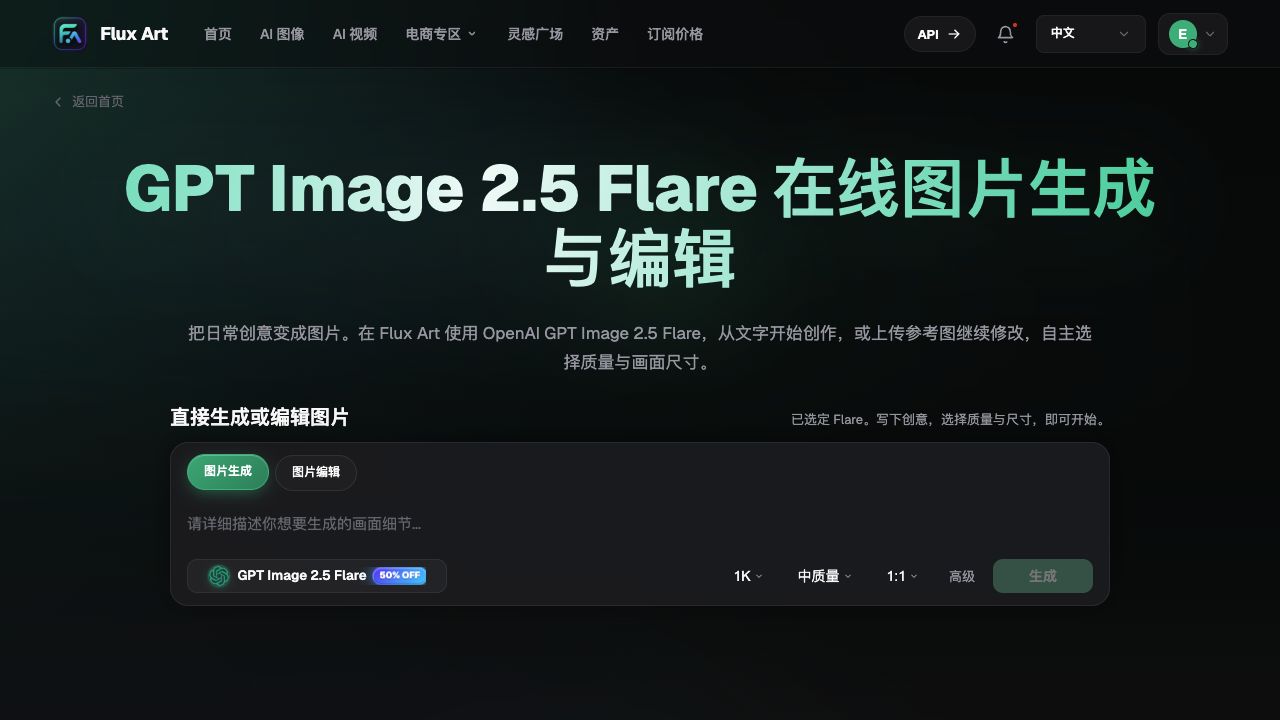
The illustration comes from the original Word file used for this article and shows the Flare page name plus generation/edit toggles. The promo copy, default quality, and dimensions are snapshot states and are not current price evidence; it is also not a result from the three tasks in this article.
Complete one practical daily pilot in five steps
Step 1: Write an acceptance card for the task. Record usage purpose, source filename, final deliverable type, and elements that must not change. Compare product names and label text against approved materials word-for-word; do not use “looks close enough” as a standard. Define in advance which error types will stop this path.
Step 2: Preserve the original inputs. Keep one copy each of the source image, reference brief, and prompt. An input example could be: “Only adjust the desk background, preserve product shape, label placement, and existing colors; do not add any accessories.” This is a testable instruction, not a guarantee the model will execute it correctly every time.
Step 3: Make only one clear modification. Upload the corresponding reference, confirm the actually selected model, mode, and settings before submitting. When results return, check the preserved items first, then the target modification. Do not silently carry incorrect labels into the next round just to keep a nice background.
Step 4: Continue from a passing version. If the current result passes, duplicate it as a new input and record the parent version; if the subject is altered, revert to the last passing image instead of compounding on a failed version. For every round, log “what changed, what was kept, and why it passed.”
Step 5: Convert conclusions into task ownership. For example, some cover types may continue in small-scale use, some product labels still require compositing with real photographs, and some person edits need additional references before evaluation. These are acceptance decisions you make, not scores from the platform, and you do not need to merge all three task types into one generic answer.
Five folders for desktop delivery: references, prompts, drafts, finals, acceptance
Before starting, create five subfolders in your own project directory instead of overwriting platform or colleague files. This is a local archiving recommendation and does not imply Flux Art auto-creates folders or has built-in approval workflows. Keep read-only originals in the references folder, and separate edit copies from final deliverables so samples are not mistaken for approved outputs.
| Folder | Contents to keep | Handoff check |
|---|---|---|
| References | Approved source images and usage instructions | Traceable to original file, no thumbnails as stand-ins |
| Prompts | Input text, edits, and preserved items | Matches this round’s task |
| Drafts | Specific model, specs, and candidate files | Compare under identical conditions, no mixing between tasks |
| Finals | Chosen complete downloaded files | Check pixels, text, logos, and product structure |
| Acceptance records | Owner, time, parent version, and external retouching | Which version is approved and what limitations remain |
File names can include project, use case, model, version, and date, for example cup-hero-sunburst-v03-20260910.webp. Open the actual file before sending; do not judge sharpness from browser thumbnails. Verify product colors against real references and controlled color workflows; an uncalibrated screen cannot prove standard color values. If labels, crops, or text were edited in external software, record the steps and final file together.
When scaling to systematic batch production, do not replace task management with many tabs. Check the current API index of your selected provider first. The GPT Image 2.5 web name is not a confirmed Flux Art OpenAPI model ID. Until usable API parameters are confirmed, continue with the validated manual handoff process and avoid presenting planned automation as an already launched capability.
Asset logs should locate parent versions, not only the latest file
Flux Art provides asset management and image creation capabilities, but the task cards, parent-version links, and approval records in this section are workflow methods recommended for external spreadsheets or project docs. They do not claim Flux Art has a built-in approval process. Store source files, candidates, passed versions, and non-adopted results separately so no file is only labeled as “final version.”
| Record field | What to write | Problem it solves |
|---|---|---|
| Task and source image ID | Current task, original file, and usage scope record location | Shows what source the image is based on |
| Current input and parent version | Source image or a previously passed candidate | Lets you trace which version editing started from |
| Actual model and settings | Selected model name, mode, quality, aspect ratio | Prevents mixing different conditions as one trial |
| Changes and preserved items | One change and requirement preserved item by item | Detects unnecessary coupled changes |
| Result and decision | Adopt, add references, rework, or reject with reason | So the next person does not have to guess |
The acceptance record for actual adoption should include delivered files, not only thumbnails from chat. If title, crop, or labels were added later, note the external edits and do not attribute the final image solely to the model. For more systematic file naming, see the Flux Art guide: Related resource . This article adds usage-focused trial records and does not promise pixel-perfect reproduction with the same parameters.
When not to add it to the daily list yet
If the source is blurry, requirements change every day, or long copy must be accurate character by character, solve material, decision, or layout issues first. A model can generate candidates, but that does not mean it fixes unknown product facts. Keep manual retouching or legacy workflows as fallback routes, and do not scale up if trial results do not improve outcomes.
You can start a trial in Flux Art’s GPT Image 2.5 topic Model hub , and check the specific version on the current interface. For price and optional settings, use the current in-page display before submission; do not assume free quotas. Flux Art is operated by MORNING STAR INDUSTRY LIMITED, and the models are developed by OpenAI; the platform and model are not the same entity.
Source verification date is 2026-09-09: OpenAI announcement Related resource ; Flare documentation Model hub ; Sunburst documentation Model hub . This article provides a recommended process and has no independent benchmark data.
Extended reading and verification boundaries
Quality and size guide. External Chinese materials are for further reading only; older articles cannot be evidence for current version buttons, pricing, or account rules.
First image tutorial. External Chinese materials are for further reading only; older articles cannot be evidence for current version buttons, pricing, or account rules.
Image delivery checklist. External Chinese materials are for further reading only; older articles cannot be evidence for current version buttons, pricing, or account rules.
Model source: OpenAI model announcement. Retrieval date is 2026-09-10. This article does not include paid generation, account settlement, or device compatibility testing; process diagrams and official demo images are not independent test results. Flux Art is operated by MORNING STAR INDUSTRY LIMITED and is a multi-model AI visual creation and production platform; the models are provided by OpenAI.