 Flux Art
GPT Image 2.5 is the family name commonly used for this generation of image models, while Flare and Sunburst are the specific version names; ChatGPT Images 2.5 appears in OpenAI product announcements. Flux Art is a multi-model AI visual creation and production platform that provides model access and visual workflows, and it is not the model developer. You can only distinguish what model is being selected, what input is uploaded, and which functions belong to the platform actually in use if you understand these layers.
A naming map that separates product, model, and platform
OpenAI announced ChatGPT Images 2.5 on 2026-09-08, and the announcement also introduced the image experience in ChatGPT and two API models. The two are related, but the names are not interchangeable. Seeing an article about ChatGPT does not mean every interface feature shown there appears in other workspaces, and seeing a specific model name does not mean all platforms use the same API parameters.
| Name on page | How to understand it | What you can confirm from it | What you cannot infer directly |
|---|---|---|---|
| ChatGPT Images 2.5 | Image product and model update name in OpenAI announcements | The announcement is introducing the ChatGPT image experience and related model updates | That all ChatGPT interface features are available across other platforms |
| GPT Image 2.5 | Family-level naming for this generation | Discussion about this generation of image generation and editing models | A specific task has already selected Flare or Sunburst |
| GPT Image 2.5 Flare | Specific model version | Officially positioned for everyday fast creation | A fixed generation time for every task |
| GPT Image 2.5 Sunburst | Specific model version | Officially positioned for detailed editing | Perfect structure, people, and small text in every case |
| Flux Art | Multi-model AI visual creation and production platform | Provides model entry points and its own web workflow | That Flux Art is OpenAI or develops the models listed above |
| Generate, edit, quality, size | Modes and settings of the current workspace | Indicates the current input method or submission choice | That setting names are the model provider's API parameters or cross-platform entitlements |
Flux Art is operated by MORNING STAR INDUSTRY LIMITED, and the promoted official site is https://flux-art.net. It is also not Black Forest Labs' single FLUX.1 model. Separately tracking brand name, model name, and mode name makes it easier to troubleshoot misselected versions or misunderstood functions than saying only "using 2.5."
Text and images are inputs, output still needs validation
Text-to-image generation uses prompts that describe the scene to create. Image-guided editing changes specific parts after providing a reference image. Multi-round modification carries one result or approved version forward as the base for the next round. All three can appear in one creative task, but this does not mean every platform automatically remembers every past requirement.
| Task mode | Input to prepare | Expected result | What to verify |
|---|---|---|---|
| Create from text | Subject, environment, composition, and purpose | A set of generated image options | Object relationships, text, and fitness for the intended use |
| Reference image edit | Approved image, items to change, and items to keep | Edited candidates based on the reference | Whether the subject, labels, pose, or other details changed unexpectedly |
| Modify again from an approved version | Explicit previous version file and new requirements | A new round of candidate images | Whether previously approved parts regressed and whether the parent version is correct |
For example, a product photo that requires a background change should provide the source photo and text instructions about what to change. It does not authorize the model to add a new port or connector to the product, and it cannot prove the product's unseen rear structure. If the output adds seemingly plausible accessories, you should still judge against physical reference materials and treat it as requiring correction; do not use generated content as proof of product facts.
Similarly, changing clothes in a real-person photo is different from generating a fictional person. Flux Art output can be used commercially. For a real-person edit, use a photo and likeness you have permission to use, then check that the final image preserves the intended identity and clothing details.
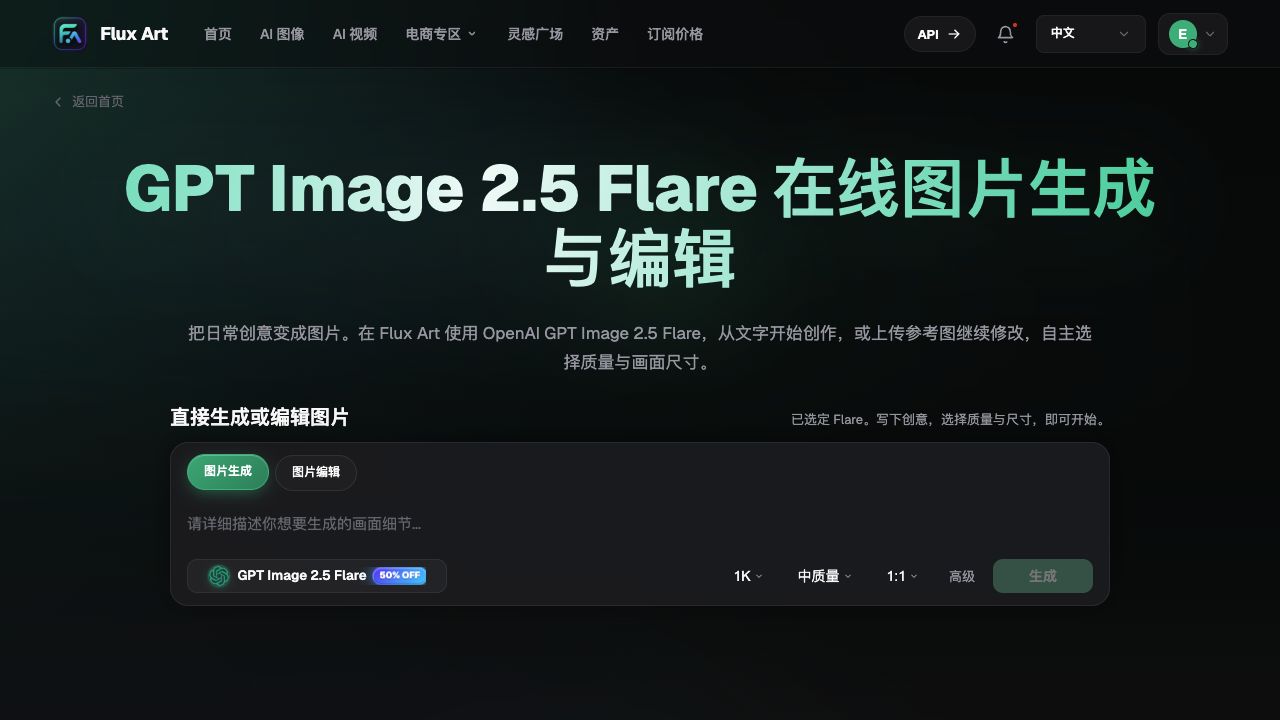
The screenshot comes from the original Word file and shows the full Flare name plus generate and edit entry points. It is interface material, not independent benchmarking. Promotional rates and default tiers shown in the screenshot should not be treated as current entitlements or performance guarantees.
Read pages in five steps and avoid confusion from similar names
Step one: first check which page you opened. Distinguish OpenAI announcements, original model documentation, and Flux Art model pages. Determine ownership of features by the product that the document belongs to; do not treat every interface as the same just because it says 2.5.
Step two: read the full model name. Record Flare or Sunburst, not just the version number. When multiple similar cards appear on a workspace, recheck the selected option before submission. Ensure task records match the names in screenshots to avoid grouping different versions under one label.
Step three: confirm whether this is generation or editing. If an image upload entry is available, it only means the page supports reference input; it does not mean any image can be accurately edited. Confirm whether the uploaded file is the original image or an approved version, and state the editing target clearly to avoid using the wrong candidate as the new base.
Step four: separate specification from capability guarantee. Quality and size are submission options, not certificates of correctness. A clear image can still have incorrect text; a larger image can also make errors look more realistic. Available settings, costs, and limits should be based on the current model page and workspace, not fixed from old screenshots.
Step five: preserve task notes that can be identified later. At minimum, record platform, full version name, mode, input files, and expected output. If someone takes over, they should be able to answer: which platform, which version, which image, and what to change, rather than only being told "continue with 2.5."
Features that do not move with the model name
Sketch, templates, and image comments in OpenAI announcements are features of the ChatGPT product and cannot be attributed to Flux Art simply because they share the same model family. Whether Flux Art provides a specific button, workflow, or setting should be determined by the current platform interface and facts. The generate/edit toggle shown in a screenshot also does not prove that a submitted task can switch models mid-execution at no cost.
There is another distinction for integration: the API model names in OpenAI documentation and the model IDs accepted by Flux Art OpenAPI are not fields you can copy directly. Before making calls, check the current docs and available model catalog of the specific service you are integrating; this article only identifies names and I/O boundaries and does not provide unverified request code.
Model improvements do not mean that subjects, text, and layout are preserved every time. For real products, long accurate copy, complex occlusions, and person editing, retaining references and manual review remain necessary. For document-level recordkeeping methods, read the in-site asset archiving guide: https://flux-art.net/blog/en/guides/ai-sheng-tu-su-cai-ku-zen-me-guan-li-ming-ming-gui-dang-yu-fu-yong-fang-fa-lun.html.
Verify on the specific version page, not from abbreviations
Flux Art’s current direct GPT Image 2.5 model page is https://flux-art.net/en/models/gpt-image-2-5. After entering, check the full version name and current action entry points; platform features, pricing, and model capability should be understood separately, and you should not rewrite OpenAI announcements as independent Flux Art test conclusions.
Source verification date: 2026-09-09. OpenAI announcement https://openai.com/index/introducing-chatgpt-images-2-5/; Flare model details https://developers.openai.com/api/docs/models/gpt-image-2.5-flare; Sunburst model details https://developers.openai.com/api/docs/models/gpt-image-2.5-sunburst. This article did not run generation, billing, or API requests.