 Flux Art
When using Flux Art with GPT Image 2.5 for reference-image editing, a browser can display the original image but that does not mean the generation service can read it. First check file address, login-dependent auth, content after redirects, and validity period; identify the input issue before fixing it, and do not keep changing prompts or creating new tasks repeatedly.
The Flux Art GPT Image 2.5 page is https://flux-art.net/en/models/gpt-image-2-5. Availability in the web app and availability in your account's OpenAPI catalog are separate. Before using the API, query GET /models with the current account to confirm the target model and editing parameters. Stop if there is no matching record; do not use an OpenAI model name as a Flux Art API model ID. This is a client-side input-checking guide, not a report of a successful API test on any account.
Separate three commonly mixed issues first
“Image visible” may only mean a logged-in browser opened the preview page. “The server can download the file” may return an error page. “The file can be decoded” may still correspond to the wrong SKU. You can only proceed when source, actual content, and material identity in the request are all confirmed. Whether a model accepts the job still depends on the current catalog, parameter validation, and actual task response.
Flux Art OpenAPI base URL is https://open-api.flux-art.net/openapi/v1. Use publicly reachable HTTPS image URLs that the server can access for reference assets. An API Key is for API authentication and should not be forwarded to image domains. Your business system must maintain asset records and check results itself; this checklist is not a built-in platform tool for URL testing, permissions review, or automatic acceptance.
Step 1: Confirm you copied a file, not a share page
When copying an address from the asset library, record the source file, corresponding SKU, usage purpose, asset version, and inspection time. Give the address to an authorized colleague and verify it in an independent read environment without login cookies. If access requires signing in to a drive, clicking a download button, or if the page still shows a title and menu, what you received is usually not a directly readable image file.
Do not make an entire bucket public for testing. Check asset authorization, privacy, and confidentiality requirements first. If you cannot provide an appropriate read path, pause that asset's entry into the API workflow and use a method that meets your internal requirements. URLs must not contain customer names or order-sensitive information; full signed URLs must not be placed in support screenshots, public code, or normal logs.
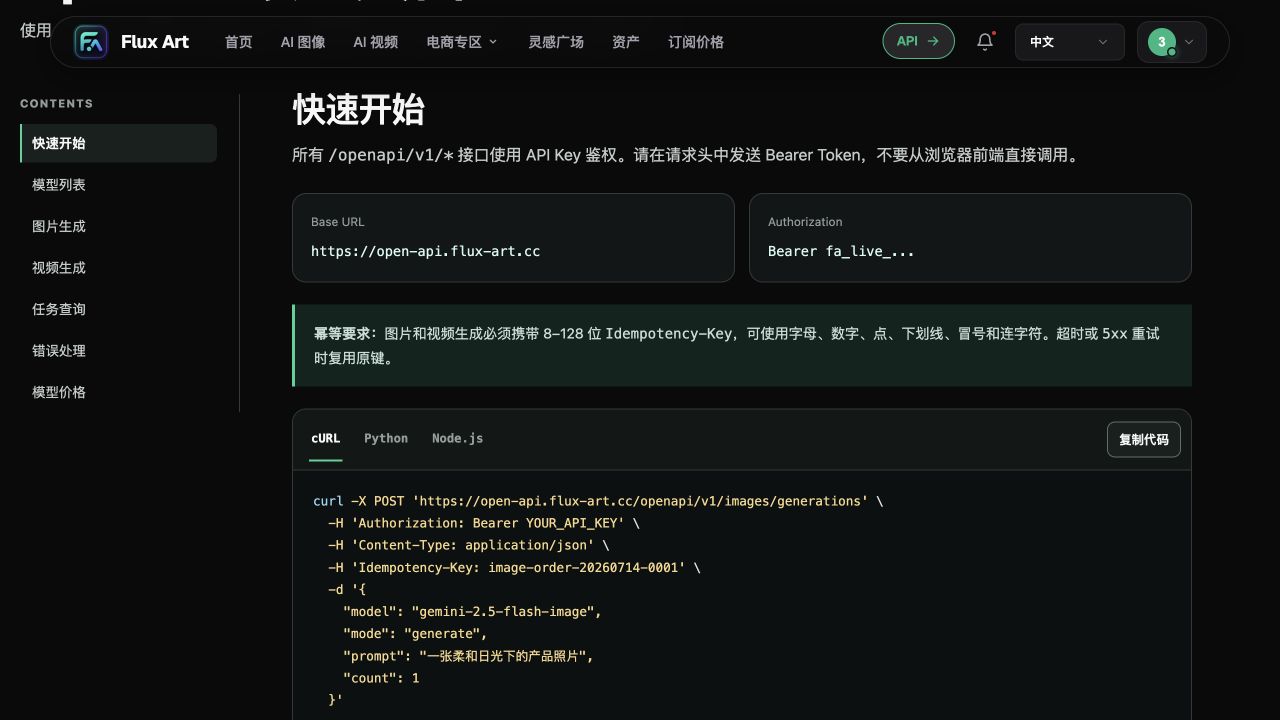
This historical Flux Art OpenAPI quick-start screenshot, retained in the original Word document, only shows how server-side authentication, the model catalog, and the generation endpoint relate. The example model shown does not prove GPT Image 2.5 availability for this account, current parameters or quotas, or a completed API call.
Step 2: Check by layers; do not treat HTTP 200 as fully passed
Use a controlled download program to run a real GET check with size and time limits, not just reading response headers. Only test with authorized asset URLs and do not expose uncontrolled server-side downloads to arbitrary user input. A precheck environment is not the same as Flux Art’s actual image retrieval environment, so record where it passed and do not label a local pass as platform pass.
| Check layer | Evidence required | What to do if it fails |
|---|---|---|
| Address identity | HTTPS file address matches the registered asset | Find the true file URL and exclude local paths or share pages |
| Access condition | Read result does not depend on browser login state | Have storage owner review object access policy without bypassing permissions |
| Address redirect | Each redirect, final URL, and final response are logged | Determine whether it went to login page, expiry page, or a different asset |
| Content validity | Actual file can be fully opened by image decoder | Exclude HTML error pages, empty files, and truncated downloads |
| Asset consistency | Downloaded content matches approved original image | Cross-check SKU, reference-image order, and file version |
HEAD can preview content type and size, but it does not return the body and cannot prove that a complete image is readable. If HEAD is unavailable but GET is available, record the method differences; do not conclude the asset is missing based on one HEAD failure. Conversely, a successful HEAD does not replace post-download decoding and visual verification.
Content-Type and extension are useful clues but cannot be the only conclusion. A URL ending in .jpg with a 200 status may still deliver an HTML error message. Verify the actual read content and file integrity, then check whether the format is accepted by the current model; do not invent GPT Image 2.5 file-size limits or format lists by experience.
Step 3: Check temporary link validity windows separately
If your storage uses time-limited access URLs, keep at least the issuance time, confirmed expiry, and submission time. For Amazon S3 presigned URLs, actual valid time is also constrained by signing credential validity, and cannot be judged only by your configured expiry value. This is a storage-service rule and does not mean Flux Art guarantees compatibility with all signed URLs.
“Readable now” does not prove it will remain readable after queueing. Set an appropriate access window based on your business's waiting and recovery arrangements, and recheck before submission; do not infer a maximum platform queue time from this. Do not assume all source images are fully cached when a task is created. If a URL expires, the storage owner should generate a compliant new URL and keep it mapped to the same asset version.
If a task has already been created, query the original task status first. queued or processing is not a reason to replace the URL and create a new task. Changing image_urls changes request content and does not count as a raw network retry for the original request; do not force the same idempotency key onto different content. Confirm old task status and the updated business intent before scheduling a new request under interface rules to avoid creating duplicate tasks while fixing links.
Step 4: Block wrong content even when URL is identical
Product source images can be overwritten while the URL stays the same; local caching may also cause operations teams to see old files. It is recommended to store both asset version and downloaded-file fingerprint in business records, and create a new record when a version change is confirmed. Different fingerprints mean different bytes but do not automatically mean the product changed; transcoding and compression can also change them, so visual verification is still required. Matching fingerprints also do not prove complete authorization context.
Record each reference image’s order, purpose, and inspection result separately; do not replace per-image checks with “one image in this set opened.” In the example, front-product and package-text close-up images have different roles; if both links actually point to the front shot, the interface may receive valid images, but the generation input is already missing source evidence for the packaging text. In that case, correct the asset mapping and do not change model to guess package text.
Step 5: Build a handoff-ready input checklist
Keep internal asset number, approved version, position in request, inspection time, read environment, final response type, full-decode success, actual fingerprint, and failure reason for each asset. Keep full signed URLs with parameters in controlled records; ordinary checklists should retain only traceable masked identifiers. Link each checklist to business requests and obtained task IDs to avoid separate technical and operations docs.
If invalid_media_url appears, first capture error.code, message, and request_id, then fix input instead of repeating identical submissions. If your own download check passes but the task still fails, pass inspection time, environment differences, and masked records to support for analysis; do not directly attribute it to model quality, regional blocking, or platform outage. This article does not claim prechecks can identify all server-side failures.
The conditions for proceeding are: assets can be provided through permitted means, checks cover the actual inputs, the current model catalog confirms the relevant capability, and the actual response for the individual task is verified. After image generation, still verify product structure, text, and color; readable input is a threshold, not a guarantee of visual correctness or sale-ready output. First-time create and query flow can be found at https://flux-art.net/blog/en/guides/gpt-image-2-5-openapi-shou-ci-jie-ru-cong-mo-xing-mu-lu-dao-yi-bu-tu-pian-jie.html.
Source and date: 2026-09-10. OpenAI release note verified at https://openai.com/index/introducing-chatgpt-images-2-5/, which only states the general positioning of the model family and does not prove Flux Art account interface permissions. HTTP method and redirect references: https://developer.mozilla.org/en-US/docs/Web/HTTP/Reference/Methods/HEAD and https://developer.mozilla.org/en-US/docs/Web/HTTP/Guides/Redirections; temporary URL validity examples: https://docs.aws.amazon.com/AmazonS3/latest/userguide/using-presigned-url.html. All checked on 2026-09-10. Current Flux Art product and interface standards follow the official site https://flux-art.net and the account console documentation.